-
Products & Solutions TopProducts & Solutions

-
 Products & Solutions Top
-
Drives & Controls
-
UPS & Industrial Power Supply
-
Sensors & Measurements
-
Energy Management
-
Monitoring & Control System
-
Distributions & Controls
-
Transmission & Distribution
-
Transit System
-
Semiconductors
-
Energy
-
Food and Beverage Distribution
-
Service & Equipment Upgrades
-
Solutions
-
-
IR TopInvestor Relations
"Screen No. Error"
"Screen No. Error"
- Category :
-
- GLOBAL > HMI > V8/TS2060 series > Error
Answer
At the start of communication, the V8/TS series initially displays the screen corresponding to the value specified for "n+2" in [Read Area].
"Screen No. Error" is displayed when the screen number entered for "n+2" in [Read Area] does not exist in the screen program.
Check the value of "n+2" in [Read Area] and change it to the value of an existing screen number.
If the device memory of [Read Area] is unknown, check the following locations.
V8/TS series
Check position: V-SFT-6 editor [System Setting] →[Hardware Setting]→ [Read/Write Area]→ [Read Area]
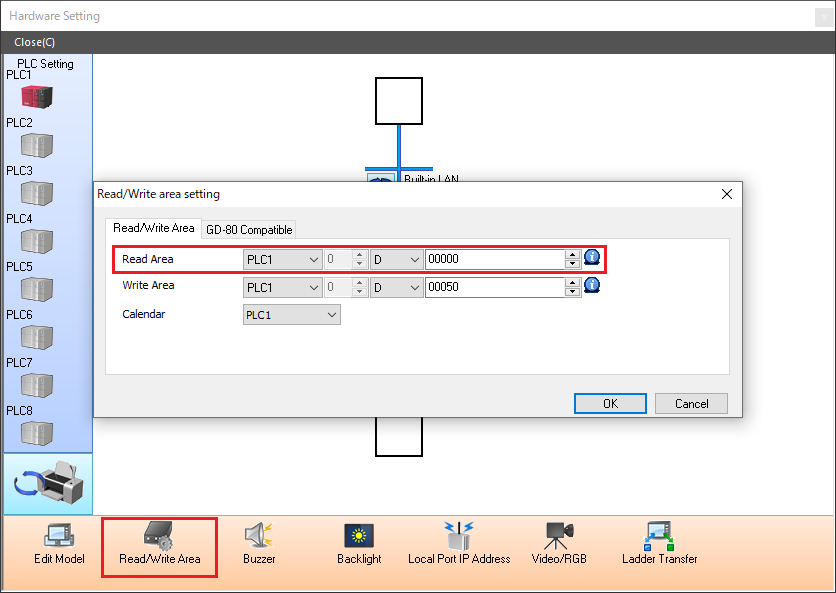
Example) In the above screenshot, since the value of "n+2" in [Read Area] is "D00002", check the value of "D00002" on the PLC and change it to the value of an existing screen number if necessary.
* If the [GD-80 Compatible Read/Write Area] checkbox is selected in the
[GD-80 Compatible] tab window, check the lower 8 bits of the device memory
for "n+1" in [Read Area].
V7 series
Check position: V-SFT-5 editor [System Setting] →[PLC Communication] →[Communication Parameter] →[Main 1]
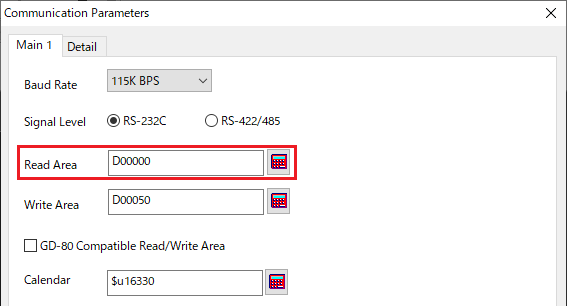
Example) In the above screenshot, since the value of "n+2" in [Read Area] is "D00002", check the value of "D00002" on the PLC and change it to the value of an existing screen number if necessary.
* If the [GD-80 Compatible Read/Write Area] checkbox is selected, check the
lower 8 bits of the device memory for "n+1" in [Read Area].
If "Screen No. Error" is displayed when the emulator starts
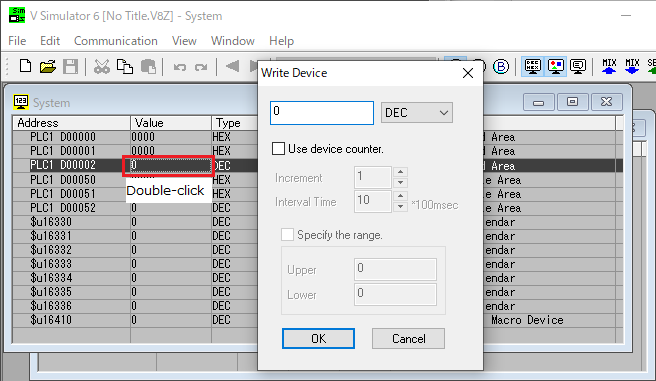
Double-click the value of "n+2" in [Read Area] displayed in the [System] window of the simulator and change it to the value of an existing screen number.