


-
Products & Solutions TopProducts & Solutions

-
 Products & Solutions Top
-
Drives & Controls
-
UPS & Industrial Power Supply
-
Sensors & Measurements
-
Energy Management
-
Monitoring & Control System
-
Distributions & Controls
-
Transmission & Distribution
-
Transit System
-
Semiconductors
-
Energy
-
Food and Beverage Distribution
-
Service & Equipment Upgrades
-
Solutions
-
-
IR TopInvestor Relations
- GLOBAL > HMI > V10/V9 series > Operation Troubles > I want to show a multi-overlap using PLC command but the overlap does not appear.
I want to show a multi-overlap using PLC command but the overlap does not appear.
I want to show a multi-overlap using PLC command but the overlap does not appear.
- Category :
Answer
Check the following points:
- Multi-overlap (icon)
 is not place on the screen.
 - Multi-overlap setting (icon) is not correct.
- Macro commands are not correct.
- To show multi-overlap using a switch, please click here .
- To show multi-overlap using PLC command, please click here .
- Go to [Home] or [Parts] > [Multi-overlap] and place a multi-overlap icon.
This icon still works when you place it outside editing area of the screen.
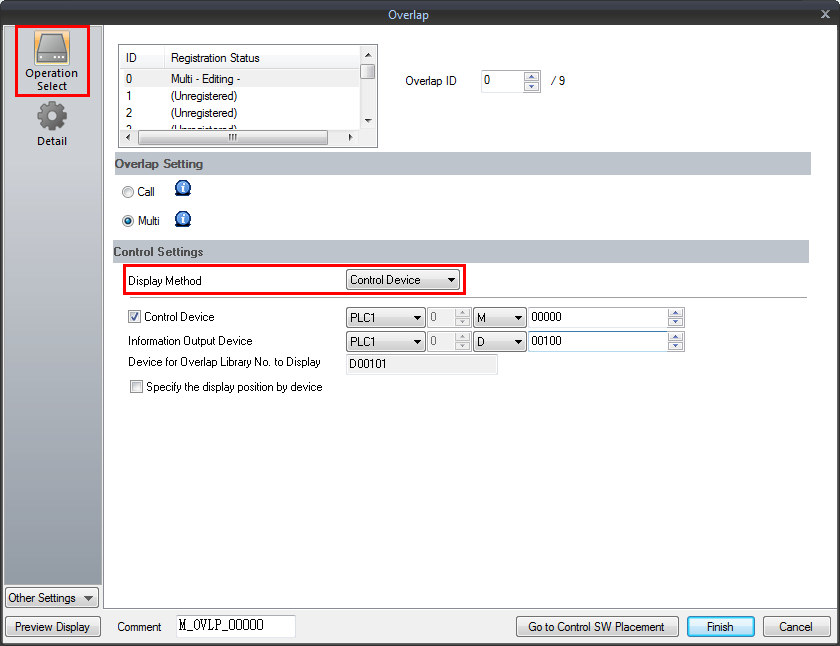
- Double-click the multi-overlap icon and sselect [Multi] from [Overlap Setting] and select [Control Device] from [Display Method] pulldown box.
- E.g.) Multi-overlap icon is set as below:
Control device: M0
Device for Overlap Library No. to Display: D101
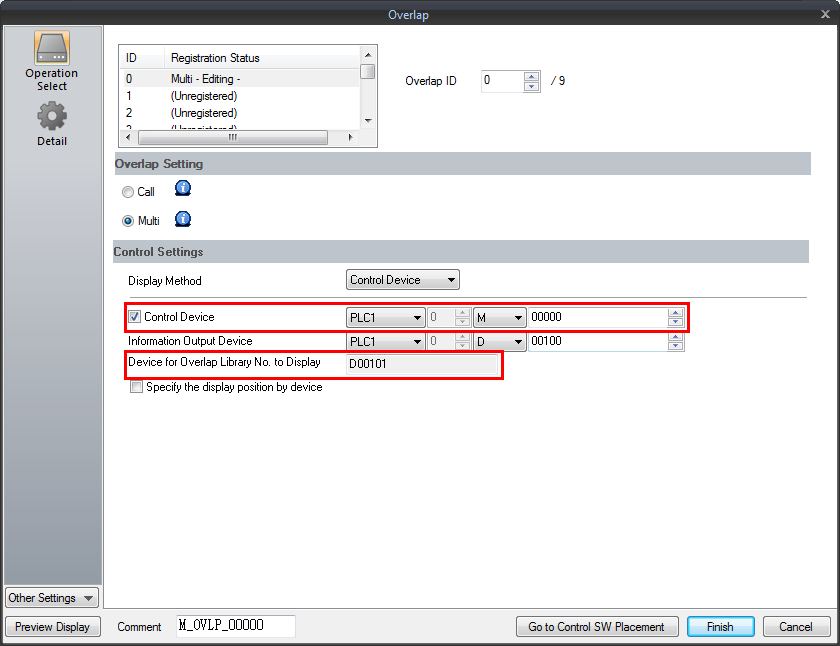
To show the overlap library No. 3:
1) Enter "3" to D101 (Device for Overlap Library No. to Display).
2) Set the control device M0 to ON.