- GLOBAL > HMI > V8/TS2060 series > Operation Troubles > The Card Format switch (SRAM format) is not effective when pressed.
The Card Format switch (SRAM format) is not effective when pressed.
The Card Format switch (SRAM format) is not effective when pressed.
- Category :
Answer
<Causes>
- The set word count for [Memory Card Emulation Area] is too small.
- There is no memory card mode icon.
<Solutions>
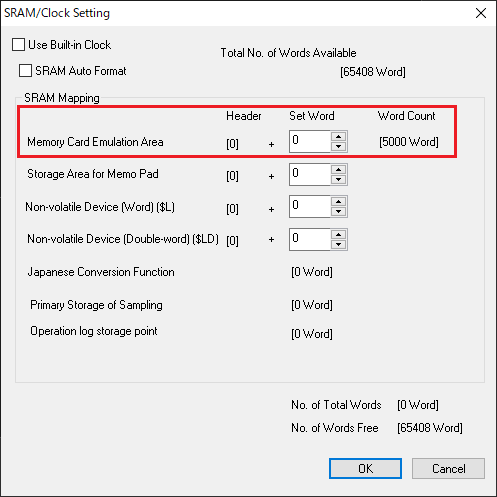
- Select [System Setting] → [Unit Setting] → [SRAM/Clock] → [Memory Card Emulation Area], and specify a value greater than [Word Count] for [Set Word].
Example: When the used word count is "5000", set "5000" or more for the set word count.
- Select [Parts] → [Catalog] → [Parts:Memory Card] → [Group:FormatSwitch], and place a new switch on the screen.
 |
In the case of the V8/TS series, the "Card Format" switch is not necessary.
|