- GLOBAL > HMI > V8/TS2060 series > Error > Communication error "Timeout"
Communication error "Timeout"
Communication error "Timeout"
- Category :
-
- GLOBAL > HMI > V8/TS2060 series > Error
Answer
This error is displayed when the V/TS series does not receive an answer from a connected device (PLC, temperature controller, etc.) within the predetermined time after issuing a request to send.
[In cases where the error occurs before communication]
<Causes>
- The communication cable is not connected correctly or is disconnected.
- Communication settings on the V/TS series do not match those of the connected device.
<Solutions>
- Check the cable connection.
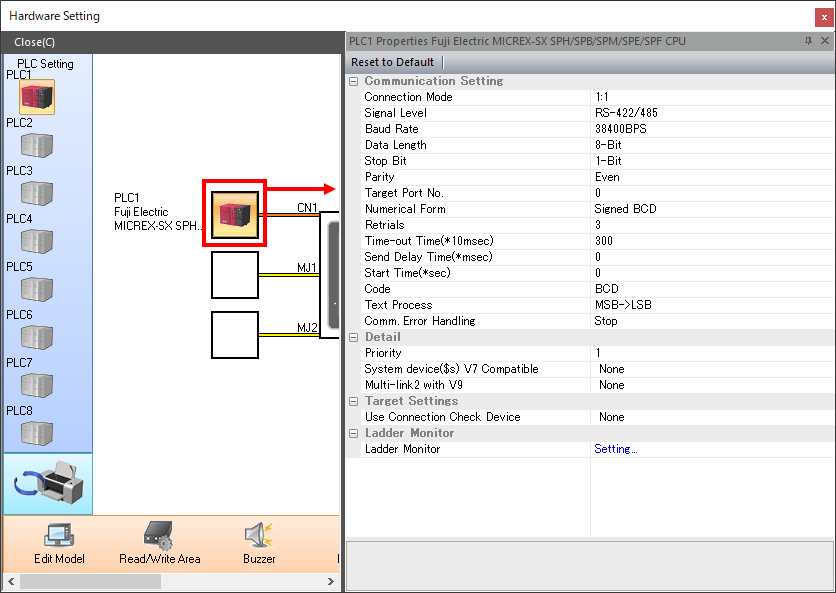
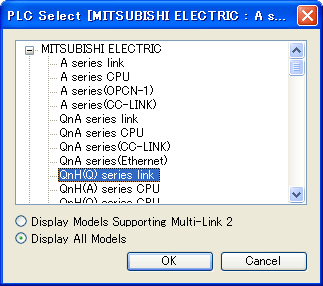
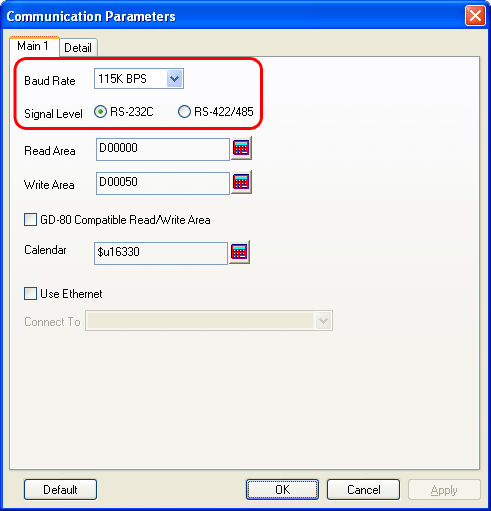
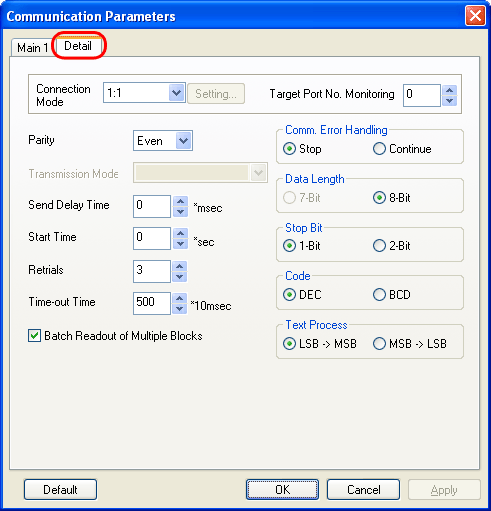
- Check that the selection of [Maker] and [Series] on the V/TS series is correct and that the communication settings including baud rate, data length, stop bit, and parity are the same between the connected device and the V/TS series.
V8/TS series
Setting location: V-SFT-6 editor [System Setting] → [Hardware Setting] → [PLCx Properties]
V7/V6 series
Setting location: V-SFT-5 editor [System Setting] → [PLC Communication] → [PLC Model], [Communication Parameter]
[In cases where the error occurs during normal communication]
<Cause>
Data may be disrupted because of noise.
<Solution>
Provide protection against noise.