- GLOBAL > HMI > V10/V9 series > Error > A TCP connection cannot be established.
A TCP connection cannot be established.
A TCP connection cannot be established.
- Category :
-
- GLOBAL > HMI > V10/V9 series > Error
Answer
This error occurs when a TCP connection cannot be established when connecting to a network device using TCP/IP.
<Cause>
- The LAN cable is not connected correctly.
Or power to the connected device is not turned on. - Communication settings (IP address, port number, etc.) on the V series
do not match those of the connected device.
<Solutions>
Case A
- Determine the line status by conducting a network test.
For information on network testing, click here. - Turn power to the connected device off and on again.
Case B
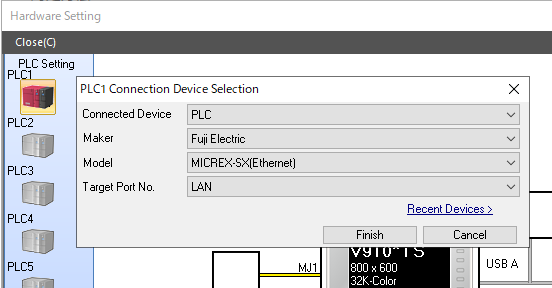
- Check that the [Maker], [Model], and [Target Port No.] settings of the connected device are configured correctly in the screen program.
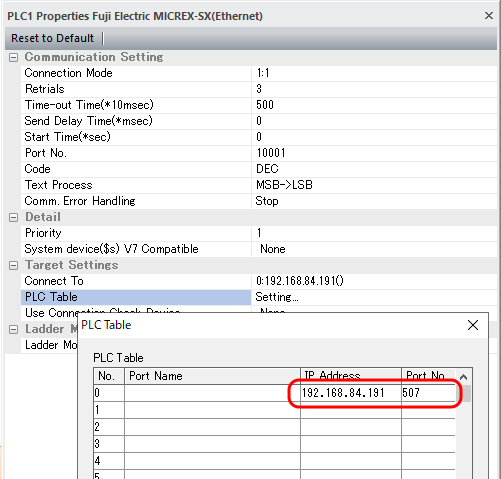
- Check that the IP address, port number, and other communication settings match on both the connected device and the V10/V9 series unit.
Example) MICREX-SX (Ethernet)
How to check the manufacturer and model of the connected device:
Double-click on [PLC Setting] located at [System Setting] → [Hardware Setting].
How to check the communication settings:
Click [System Setting] → [Hardware Setting] → [PLC Properties] → [PLC Table] → [Setting].
* If the [Restore Screen Data Settings] switch is displayed in Local mode on the V10/V9 series unit under [LAN Setting] → [Comm. Setting], press the switch and then press the [Apply] switch at the lower right of the screen.