-
Products & Solutions TopProducts & Solutions

-
 Products & Solutions Top
-
Drives & Controls
-
UPS & Industrial Power Supply
-
Sensors & Measurements
-
Energy Management
-
Monitoring & Control System
-
Distributions & Controls
-
Transmission & Distribution
-
Transit System
-
Semiconductors
-
Energy
-
Food and Beverage Distribution
-
Service & Equipment Upgrades
-
Solutions
-
-
IR TopInvestor Relations
- GLOBAL > HMI > TELLUS and V-Server > Product Specifications > <V-Server> What are the V-Server startup options?
GLOBAL
<V-Server> What are the V-Server startup options?
<V-Server> What are the V-Server startup options?
- Category :
Answer
By adding these options when launching the V-Server, the corresponding operations such as automatic termination or log saving become available.
Options
| Option | Function |
| "(project file path)" | Opens the specified project file (*.vpr). |
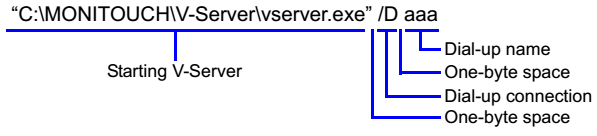
| /D (dialup connection name) | Performs the specified dialup connection. *1 |
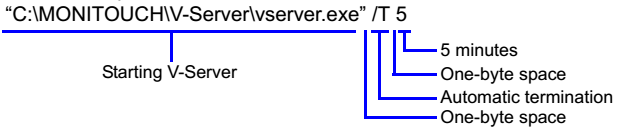
| /T (time*2) | Terminates V-Server when a specified time has elapsed from its start. |
| /L | Saves the contents of the log viewer in the text file. *3 *4 |
| /LE | Outputs only errors when saving the contents of the log viewer in the text file.*3 *4 |
| /E | Executes all registered events at V-Server startup. |
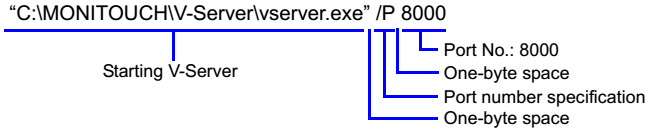
| /P (port number) | Specifies the port number to be used for the V-Server. Default port number is 8005. |
*1 Dialup settings must be configured beforehand in Windows.
*2 Unit: minutes
*3 Location and name of the text file
・Windows Vista and later:
C:\MONITOUCH\V-Server\(project name)_Log.txt
・Windows XP/XP 64 Edition:
C:\Program Files\V-Server\(project name)_Log.txt
*4 Every time V-Server starts data is added to the text file.
When the size of the text file exceeds 1MB, a backup file (*.bak) is automatically created.
Onlly one backup file is created and will be wverwritten.
Settings:
When starting V-Server, "C:\MONITOUCH\V-Server\server.exe" is executed.
Any options are to be appended to the above command.
V-Server installation locations:
Default locationF C:\MONITOUCH\V-Server
When being installed at a different location: (installation folder)\vserver.exe
Setting example:
V-Server is installed at "C:\MONITOUCH\V-Server" in all of the following examples.
Project specification
To open "test.vpr" in the "C:\MONITOUCH\V-Server\V-ServerProjects" folder

Dial-up connection
When dial-up connection name is "aaa":
Automatic termination
To terminate V-Server after five minutes of startup automatically:
Log viewer saving
To save the data in the V-Server [Log Viewer] window to a text file:

Log viewer saving (errors only)
To save only the errors in the log viewer data to a text file:

Event execution
To execute all the registered events when V-Server starts:

Port number specification
To start V-Server using port number 8000: