


-
Products & Solutions TopProducts & Solutions

-
 Products & Solutions Top
-
Drives & Controls
-
UPS & Industrial Power Supply
-
Sensors & Measurements
-
Energy Management
-
Monitoring & Control System
-
Distributions & Controls
-
Transmission & Distribution
-
Transit System
-
Semiconductors
-
Energy
-
Food and Beverage Distribution
-
Service & Equipment Upgrades
-
Solutions
-
-
IR TopInvestor Relations
- GLOBAL > HMI > V8/TS2060 series > Questions about > How to set asynchronous display of multiple lines in a trend graph
GLOBAL
How to set asynchronous display of multiple lines in a trend graph
How to set asynchronous display of multiple lines in a trend graph
- Category :
Answer
Two or more trend graph parts in the same size must be overlaid.
It is possible to display the trend lines at different timings by linking the parts with each other.
Example: When drawing two lines in a trend graph at different timings:
Place two trend graphs of the same size by overlaying one on another.
Regard one trend graph as a "parent," and the other trend graph as a "child."
The "parent" trend graph must be laid under the "child" trend graph. For the "child" trend graph, check [Overlap] and specify the same ID as the "parent" trend graph for [Link ID].
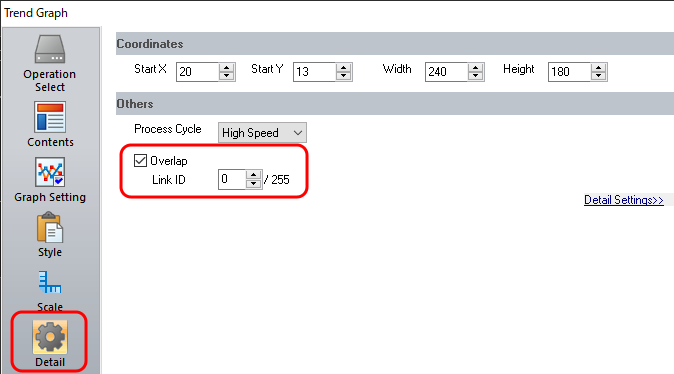

When [Overlap] is checked in the "child" trend graph setting, "redraw" & "redraw after clear" commands at the "child" trend graph will be ignored and only commands from the control device memory of the "parent" trend graph will be acceptable. Control device memory for "parent" trend graph
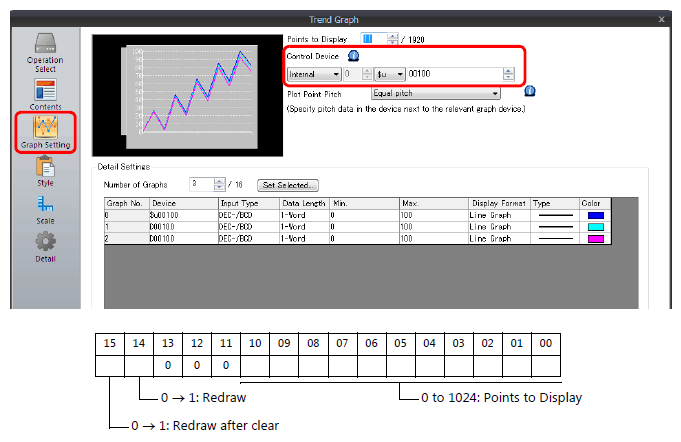
For more information about the control device memory, click here.
For more information about setting procedure and display method, click here.