


-
Products & Solutions TopProducts & Solutions

-
 Products & Solutions Top
-
Drives & Controls
-
UPS & Industrial Power Supply
-
Sensors & Measurements
-
Energy Management
-
Monitoring & Control System
-
Distributions & Controls
-
Transmission & Distribution
-
Transit System
-
Semiconductors
-
Energy
-
Food and Beverage Distribution
-
Service & Equipment Upgrades
-
Solutions
-
-
IR TopInvestor Relations
- GLOBAL > HMI > V8/TS2060 series > Questions about > How to make the screen dark when it is left untouched for a preset time
GLOBAL
How to make the screen dark when it is left untouched for a preset time
How to make the screen dark when it is left untouched for a preset time
- Category :
Answer
Set the backlight function to turn the backlight OFF.
Setting location: [System Setting] → [Unit Setting] → [Backlight]
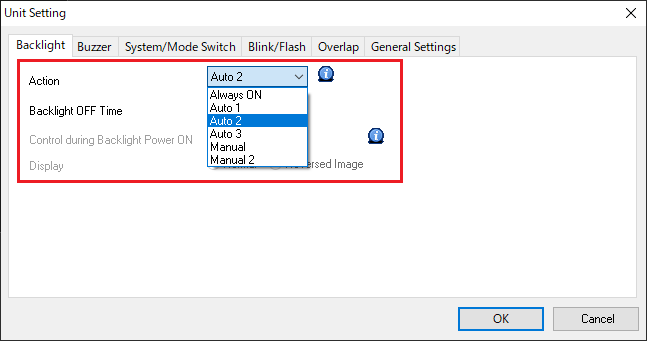
[To make backlight turn OFF when there is no screen display change or touch switch operation for a preset time]
Select [Auto 1] for [Action].
Backlight will turn OFF after the time set for [Backlight OFF Time] has elapsed.
[To make backlight turn OFF when there is no touch switch operation for a preset time even with screen display change]
Select [Auto 2] or [Auto 3] for [Action].
Backlight will turn OFF after the time set for [Backlight OFF Time] has elapsed.
The difference between [Auto 2] and [Auto 3] is the condition for turning the backlight ON. For more information, click here.
[To turn backlight OFF at the timing as specified from the PLC]
Select [Manual] for [Action].
Backlight will turn OFF when bit 11 of read area "n + 1" turns OFF (at the falling edge of [1 → 0]).
* For details about how to check Read area, click here.