


-
Products & Solutions TopProducts & Solutions

-
 Products & Solutions Top
-
Drives & Controls
-
UPS & Industrial Power Supply
-
Sensors & Measurements
-
Energy Management
-
Monitoring & Control System
-
Distributions & Controls
-
Transmission & Distribution
-
Transit System
-
Semiconductors
-
Energy
-
Food and Beverage Distribution
-
Service & Equipment Upgrades
-
Solutions
-
-
IR TopInvestor Relations
- GLOBAL > HMI > V8/TS2060 series > Operation Troubles > When a screen with an overlap display is switched to another and is switched back, the overlap part disappears.
GLOBAL
When a screen with an overlap display is switched to another and is switched back, the overlap part disappears.
When a screen with an overlap display is switched to another and is switched back, the overlap part disappears.
- Category :
Answer
<Cause>
When displaying a normal overlap or call-overlap part according to the status of the corresponding bit in read area "n + 1", this is recognized only at the leading edge (OFF → ON).
If the screen is moved back while the bit remains ON, the overlap part will not be displayed.
<Solution>
The following four methods are available.
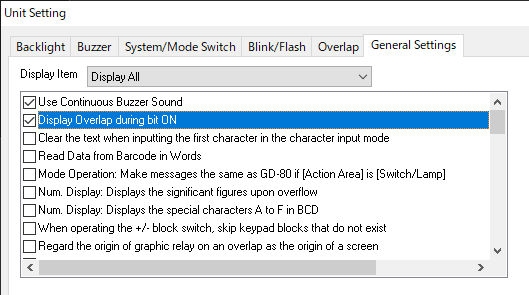
To display the overlap part whenever the bit is ON, select [System Setting] → [Unit Setting] → [General Settings] and check [Display Overlap during bit ON].
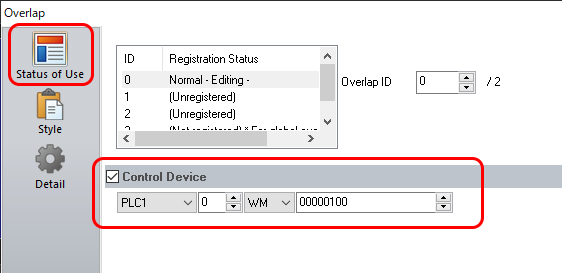
Stop using read area "n + 1", and check [Control Device] in [Status of Use] of the overlap setting dialog.
Command memory Bit 0
OFF: No display
ON: Display
Example: Control Device for normal overlap
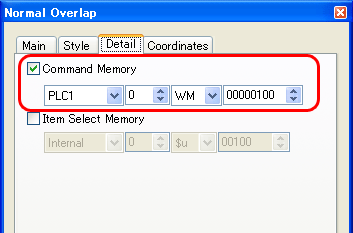
* When you use V-SFT Ver.5, check [Command Memory] in the [Detail] tab of the overlap setting dialog.
Use a multi-overlap part and call it with an external command (using the control device memory).
- Use a global overlap part.