-
Products & Solutions TopProducts & Solutions

-
 Products & Solutions Top
-
Drives & Controls
-
UPS & Industrial Power Supply
-
Sensors & Measurements
-
Energy Management
-
Monitoring & Control System
-
Distributions & Controls
-
Transmission & Distribution
-
Transit System
-
Semiconductors
-
Energy
-
Food and Beverage Distribution
-
Service & Equipment Upgrades
-
Solutions
-
-
IR TopInvestor Relations
- GLOBAL > HMI > V8/TS2060 series > Operation Troubles > The screen is not switched according to the command from the PLC (external).
The screen is not switched according to the command from the PLC (external).
The screen is not switched according to the command from the PLC (external).
- Category :
Answer
The causes are listed below.
<Causes>
- The screen number to display is not specified in read area "n + 2".
- The specified screen number is the same as the previous screen number.
<Solutions>
Check the value specified in read area "n + 2".
The value must be specified in the data format (DEC/BCD) as set in the screen data.
The set data format can be viewed in the following location.
* For details about how to check Read area, click here.
V8/TS series
Setting location: V-SFT-6 editor [System Setting] → [Hardware Setting] → [PLCx Properties] → [Communication Setting] → [Code]V7 series
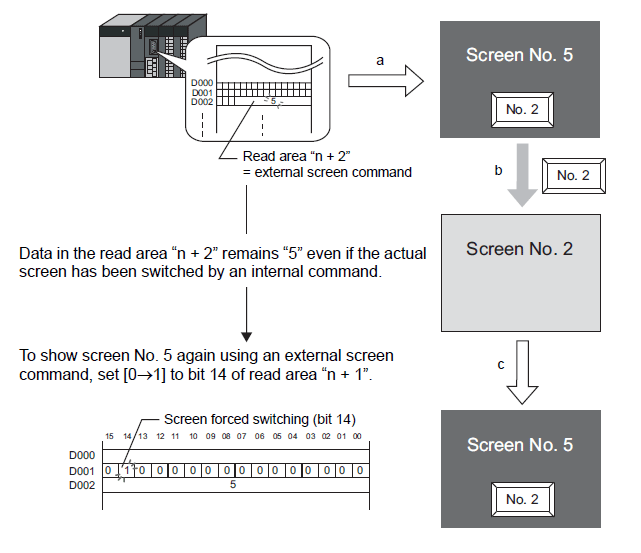
Setting location: V-SFT-5 editor [System Setting] → [PLC Communication] → [Communication Parameter] → [Detail] → [Code]- Bit 14 (screen forced switching) of read area "n + 1" must be OFF → ON (leading edge).
Example: Read area "n + 2" (D2)
Step a: Change to screen No. 5 according to read area "n + 2"
Step b: Change to screen No. 2 with an internal switch
Step c: Change to the same screen number as step a (screen No. 5) according to read area "n + 2"
In this case, however, the same value is stored in read area "n + 2" so the command is not valid.
In such a case, it is possible to forcibly switch the screen to the screen number contained in read area "n + 2" at the leading edge [0 → 1] of bit 14 of read area "n + 1" (D1).