


-
Products & Solutions TopProducts & Solutions

-
 Products & Solutions Top
-
Drives & Controls
-
UPS & Industrial Power Supply
-
Sensors & Measurements
-
Energy Management
-
Monitoring & Control System
-
Distributions & Controls
-
Transmission & Distribution
-
Transit System
-
Semiconductors
-
Energy
-
Food and Beverage Distribution
-
Service & Equipment Upgrades
-
Solutions
-
-
IR TopInvestor Relations
"Error:161 (24:x)"
"Error:161 (24:x)"
- Category :
-
- GLOBAL > HMI > V8/TS2060 series > Error
Answer
This error is displayed when the SRAM area is not formatted on the V8/TS series unit.
<Causes>
The following conditions cause this error.
<Solutions>
Case A
Format the SRAM area.
Perform formatting on the [Main Menu] → [SRAM/Clock] Adjustment screen in Main Menu screen on the V8/TS series unit.
For information on the format procedure, click here.
* For V8 series, be sure to set the battery.
For information on the battery mounting procedure, click here.
Case B
The message "Battery not set" or "Brownout of Battery" is displayed at the lower in the Main Menu screen on the V8/TS series unit.
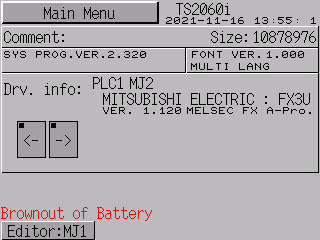
Purchase a battery and perform battery replacement.
- V8 series
Battery type: V7-BT - TS2060 series
Battery type: TS-BT(CR2032W/CR2032X) - TS1000S series
Battery type: CR2032
For information on the battery replacement procedure:
The error does not disappear just by replacing the battery. Always format the SRAM area.
For information on the format procedure, click here.
* If Error: 161 (24: x) appears due to a battery voltage drop, all data stored in
SRAM is erased. The data cannot be restored.
The service life of the battery is about 5 years. Replace the battery before the end
of its service life.