


-
Products & Solutions TopProducts & Solutions

-
 Products & Solutions Top
-
Drives & Controls
-
UPS & Industrial Power Supply
-
Sensors & Measurements
-
Energy Management
-
Monitoring & Control System
-
Distributions & Controls
-
Transmission & Distribution
-
Transit System
-
Semiconductors
-
Energy
-
Food and Beverage Distribution
-
Service & Equipment Upgrades
-
Solutions
-
-
IR TopInvestor Relations
- GLOBAL > HMI > V10/V9 series > Questions about > How to set (correct) the calendar
How to set (correct) the calendar
How to set (correct) the calendar
- Category :
Answer
The correction method differs depending on the calendar reading target (PLC or V10/V9 series).
For the reading target, check the following setting.
Setting location:
V-SFT editor [System Setting] [Unit Setting] [SRAM/Clock]
[Use SRAM Calendar]
Checked .... Clock built in the V series used
Unchecked .... Clock built in the PLC used
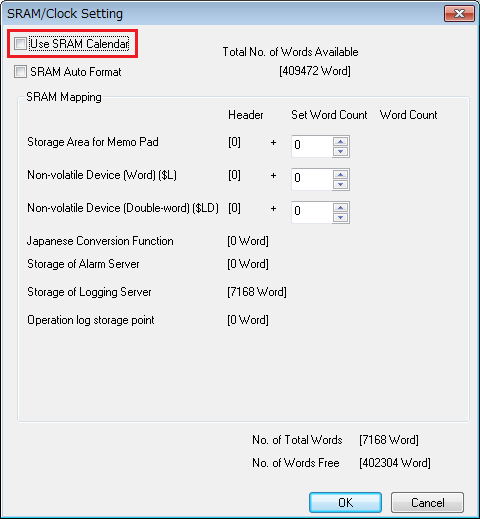
[Checked ..... Clock built in the V series used]
- Press [Date/Time Setting] in the menu icons in Local mode to display the Date/Time Setting screen.
- Configure the date and time and press the [Set] switch to confirm.
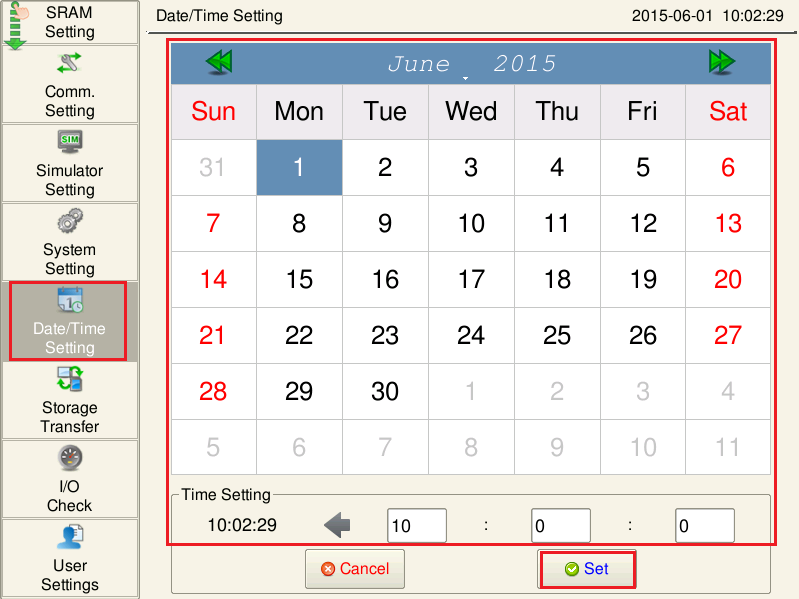
The date in the upper right corner of the screen is updated.
[Unchecked ..... Clock built in the PLC used]
- Correct the PLC calendar device memory referring to the relevant PLC manual.
- Set (0 -> 1) the device memory set at [System Setting] -> [Hardware Setting] -> [Control Area] ->[Calendar Read Device] with the V-SFT editor.
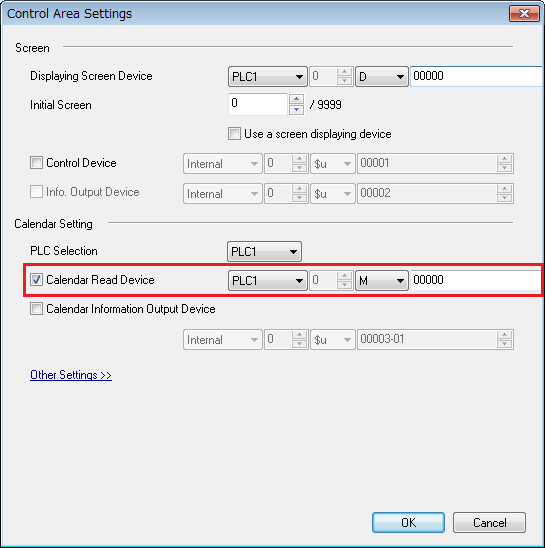
The V10/V9 series reads the PLC calendar data.
* To correct the calendar using a macro command click here.