


-
Products & Solutions TopProducts & Solutions

-
 Products & Solutions Top
-
Drives & Controls
-
UPS & Industrial Power Supply
-
Sensors & Measurements
-
Energy Management
-
Monitoring & Control System
-
Distributions & Controls
-
Transmission & Distribution
-
Transit System
-
Semiconductors
-
Energy
-
Food and Beverage Distribution
-
Service & Equipment Upgrades
-
Solutions
-
-
IR TopInvestor Relations
- GLOBAL > HMI > V10/V9 series > Questions about > How to indicate battery trouble of the V series on the PLC side
GLOBAL
How to indicate battery trouble of the V series on the PLC side
How to indicate battery trouble of the V series on the PLC side
- Category :
Answer
The condition of the V series battery is output to system device memory $s167.
For information about $s167, click here.
The condition can be transferred to the PLC as described below.
- Select [Home] → [Registration Item] → [Macro Block], specify an available number, and click [OK].
The [Macro Block] window is displayed.
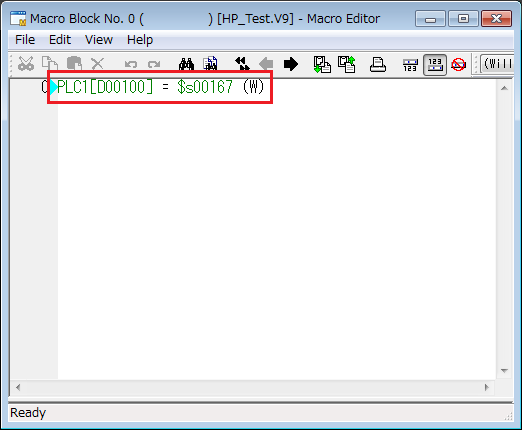
- Use the MOV macro command, and create a macro to transfer data from $s167 to the PLC memory. When created, click [x] to close.
Example: Transfer data from $s167 to D100 in the PLC device memory.
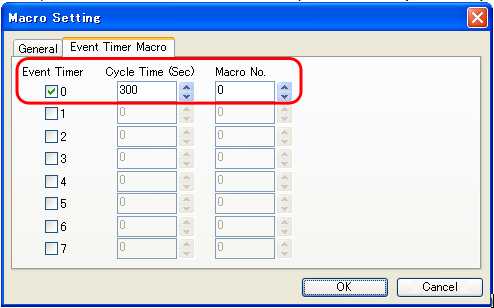
- Select [System Setting] → [Macro Setting] → [Event Timer Macro] and check a number (not in use) under [Event Timer].
Set [Cycle Time] and the macro block number created in step (2), and click [OK].
Example: Execute macro block No. 0 every 300 seconds (5 minutes).
Data in $s167 will be transferred to D100 in the PLC device memory.