


-
Products & Solutions TopProducts & Solutions

-
 Products & Solutions Top
-
Drives & Controls
-
UPS & Industrial Power Supply
-
Sensors & Measurements
-
Energy Management
-
Monitoring & Control System
-
Distributions & Controls
-
Transmission & Distribution
-
Transit System
-
Semiconductors
-
Energy
-
Food and Beverage Distribution
-
Service & Equipment Upgrades
-
Solutions
-
-
IR TopInvestor Relations
- GLOBAL > HMI > V10/V9 series > Error > When the MICREX-SX PLC is connected via the SX bus, the V10/V9 series unit encounters a communication error ("Time-Out") at startup.
When the MICREX-SX PLC is connected via the SX bus, the V10/V9 series unit encounters a communication error ("Time-Out") at startup.
When the MICREX-SX PLC is connected via the SX bus, the V10/V9 series unit encounters a communication error ("Time-Out") at startup.
- Category :
-
- GLOBAL > HMI > V10/V9 series > Error
Answer
Check the [Waiting time for structure check] and [Fail-soft operation setting] settings on the SX side.
If the [Waiting time for structure check] setting is too short, an error (serious fault) may occur in the configuration check because the V10/V9 series unit will not start up in time.
Configuring a fail-soft startup setting will prevent a serious fault from occurring even if the V10/V9 series unit does not start up in time for the configuration check and thereby prevent a communication error.
The setting procedure is described using the "SX-Programmer Expert (D300Win)" SX tool software as an example. The setting procedure is the same for "SX-Programmer Standard".
Waiting time for configuration check
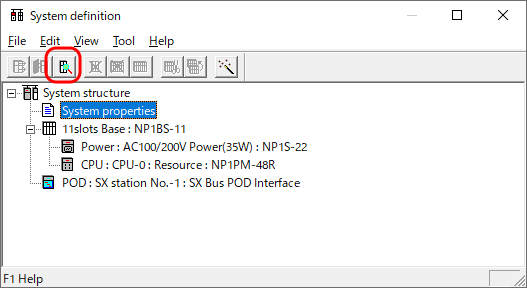
- Click [System properties] in the system definition window and then click the [Properties] button.
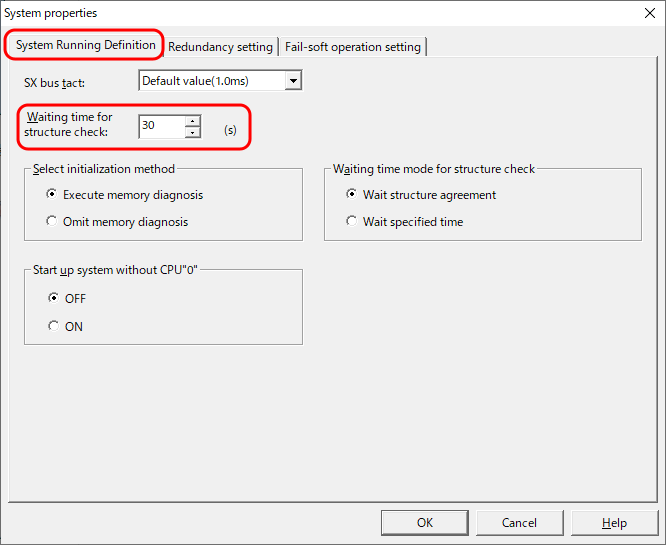
- Set [Waiting time for structure check] on the [System Running Definition] tab window as follows.
V10: 20 (s)
V9: 30 (s)
Fail-soft operation setting
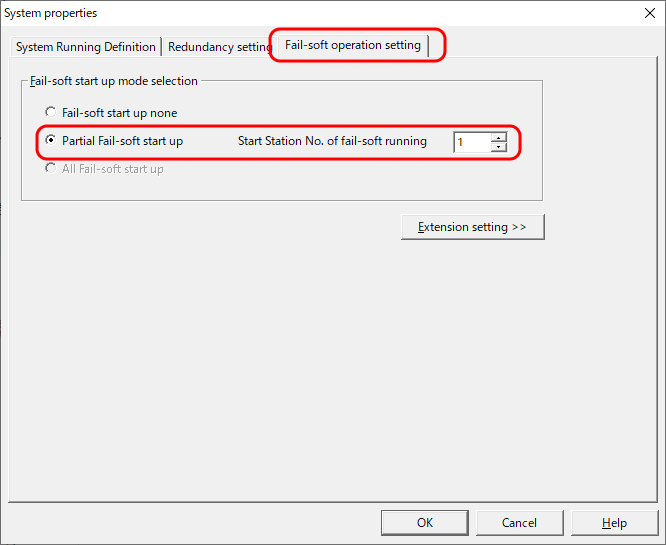
- Click the [Fail-soft operation setting] tab in the [System properties] window.
- Select [Partial Fail-soft start up] and a value for [Start Station No. of fail-soft running] in the [Fail-soft start up mode selection] area.
* Set a value so that the SX station number of the V10/V9 series unit is included in the fail-soft startup.
* For more information on the configuration check wait time and fail-soft startup operation mode, refer to the SX manual.
* For information on how to use "SX-Programmer Expert (D300Win)" and "SX-Programmer Standard", refer to the corresponding manual.