-
Products & Solutions TopProducts & Solutions

-
 Products & Solutions Top
-
Drives & Controls
-
UPS & Industrial Power Supply
-
Sensors & Measurements
-
Energy Management
-
Monitoring & Control System
-
Distributions & Controls
-
Transmission & Distribution
-
Transit System
-
Semiconductors
-
Energy
-
Food and Beverage Distribution
-
Service & Equipment Upgrades
-
Solutions
-
-
IR TopInvestor Relations
GLOBAL
"Import file is not selected"
"Import file is not selected"
- Category :
-
- GLOBAL > HMI > V10/V9 series > Error
Answer
When Fuji Electric MICREX-SX is selected, this error is displayed if screen data uses input/output memory (X, Y), or P link/PE link/FL-net (CPU No. 8, 9) memory.
This message is displayed on the V-SFT-6 configuration software when the device information file (*.ini) exported from the PLC programming tool is not imported.
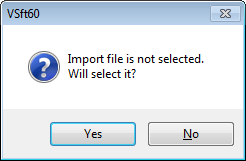
When [No] is selected, "The specified project does not exist. [-7]" will be displayed.
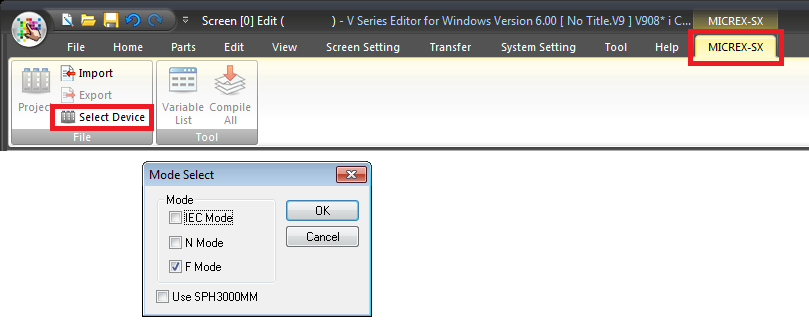
List of PLC models which require import (N and F mode only *)
- MICREX-SX (T-link)
- MICREX-SX (OPCN-1)
- MICREX-SX (SX bus)
- MICREX-SX SPH/SPB/SPM/SPE/SPF series
- MICREX-SX SPH/SPB/SPM/SPE/SPF CPU
- MICREX-SX (Ethernet)
* The current mode setting can be viewed by selecting [MICREX-SX] -> [Select Device].
<Solutions>
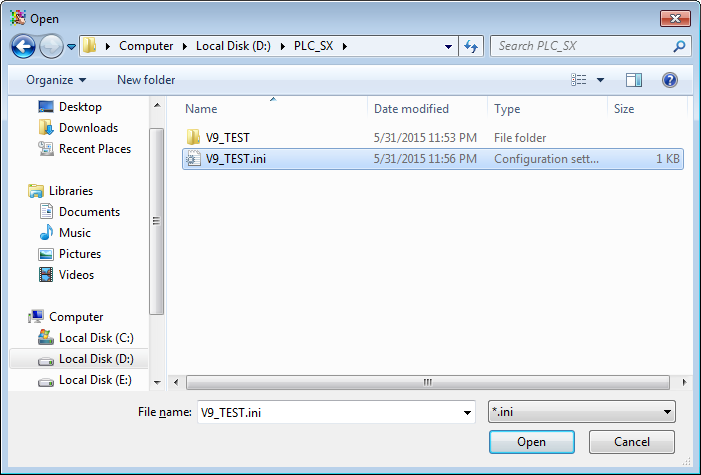
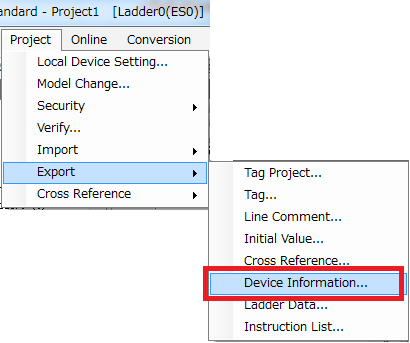
- Export a device information file (*.ini) using the PLC programming tool.
For more information about [Export Device Information], refer to the relevant PLC manual.
E.g.) SX-Programmer Standard Ver.3
- Click [MICREX-SX] -> [Import] on the screen data, and import the file output in step (1) into the screen data.