


-
Products & Solutions TopProducts & Solutions

-
 Products & Solutions Top
-
Drives & Controls
-
UPS & Industrial Power Supply
-
Sensors & Measurements
-
Energy Management
-
Monitoring & Control System
-
Distributions & Controls
-
Transmission & Distribution
-
Transit System
-
Semiconductors
-
Energy
-
Food and Beverage Distribution
-
Service & Equipment Upgrades
-
Solutions
-
-
IR TopInvestor Relations
"The size is too large to communicate."
"The size is too large to communicate."
- Category :
-
- GLOBAL > HMI > V10/V9 series > Error
Answer
This error may be displayed on the configuration software V-SFT when data is transferred.
Possible causes and solutions are given below.
<Cause>
The size of the screen data to transfer may have exceeded the capacity available with the V series.
<Solution>
Select [Tool] -> [List of Memory Use] on the V-SFT-6 editor and check the screen data size.
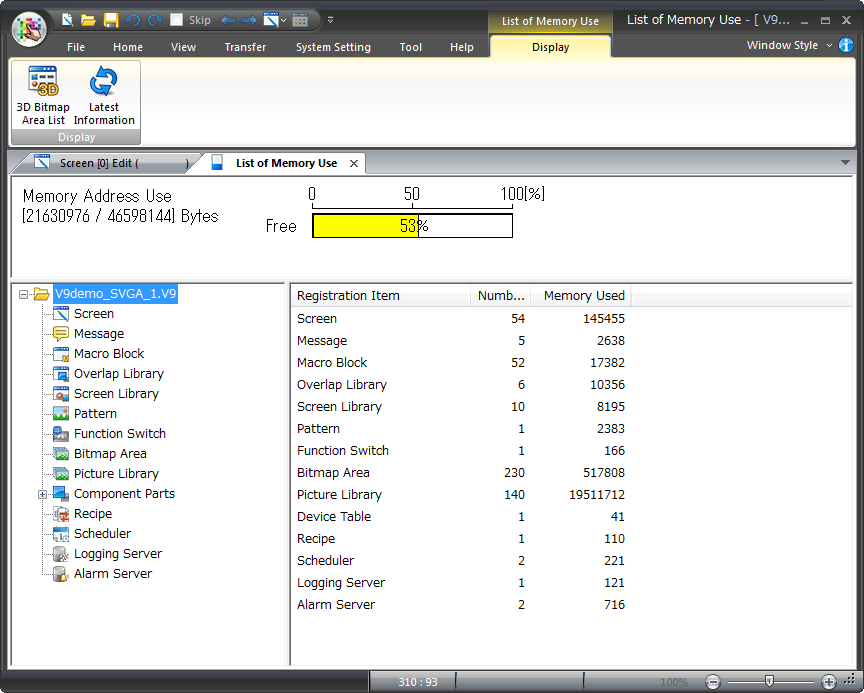
If the capacity is exceeded, make the screen data size smaller.
For example, store message and pattern data on a storage device to reduce the screen data size.
[Setting location]
V-SFT-6 editor [System Setting] -> [Other] -> [Storage Setting]