-
Products & Solutions TopProducts & Solutions

-
 Products & Solutions Top
-
Drives & Controls
-
UPS & Industrial Power Supply
-
Sensors & Measurements
-
Energy Management
-
Monitoring & Control System
-
Distributions & Controls
-
Transmission & Distribution
-
Transit System
-
Semiconductors
-
Energy
-
Food and Beverage Distribution
-
Service & Equipment Upgrades
-
Solutions
-
-
IR TopInvestor Relations
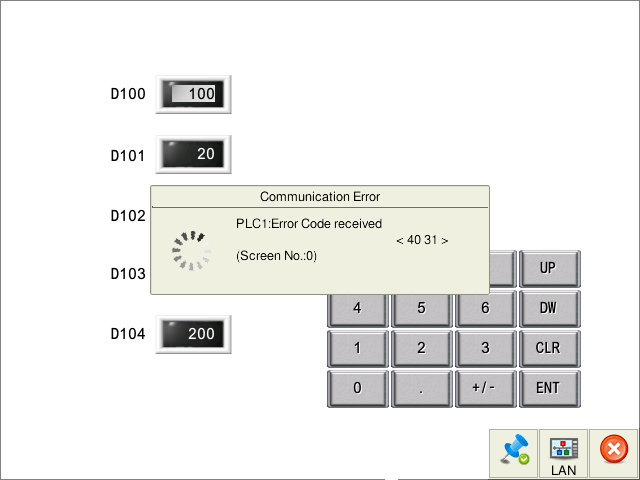
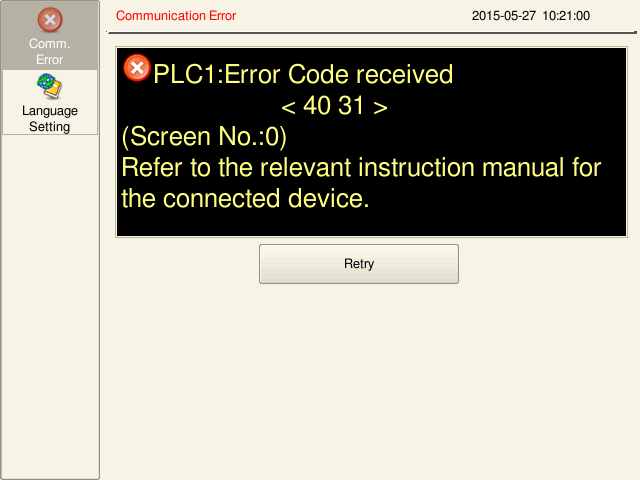
Communication Error "Error code received"
Communication Error "Error code received"
- Category :
-
- GLOBAL > HMI > V10/V9 series > Error
Answer
The "error code" in this message indicates errors occurring on the connected device side. Frequently occurring errors are: the PLC device memory address specified by the V series does not exist on the connected device or is out of the available range. Please refer to the following sites for list of frequently occurring error codes:
- For Mitsubishi Electric and Fuji Electric PLC devices, click here.
- For other PLC devices, click here.
* For information about manufacturers or error codes not listed, refer to the relevant connection manuals.
[In cases where the error occurs immediately after the V series has started to run]
A PLC device memory address specified for a setting item used on all screens, such as for control area, device memory for backlight and buzzer control, alarm server, logging server, scheduler function, event timer macro, etc., may be the cause of the error.
Check if the specified PLC device memory address is out of range or illegal.
[In cases where the error occurs only with a specific screen]
A PLC device memory address specified for the screen with which the error is occurring may be the cause of the error.
Check if the specified PLC device memory address is out of range or illegal.
 Depending on the setting for [Comm. Error Handling], the error display on the V series may vary.
[Comm. Error Handling] can be configured as below.
Setting location: V-SFT editor [System Setting] -> [Hardware Setting] -> [PLC Properties]
- "Comm. Error Handling: Stop"
- "Comm. Error Handling: Continue"