- GLOBAL > HMI > V8/TS2060 series > Questions about > How to read or write data between the PLC, temperature controller and inverter at regular intervals
How to read or write data between the PLC, temperature controller and inverter at regular intervals
How to read or write data between the PLC, temperature controller and inverter at regular intervals
- Category :
Answer
Use [Device Memory Map Setting] .
Periodic Reading
- Click [System Setting] → [Device Memory Map] → [PLCn]. Select a device memory map number and click [OK].
- Click [Edit] → [Device Memory Map Setting] or double-click the cell [Target Device 1/2] to display the settings window and set the following.
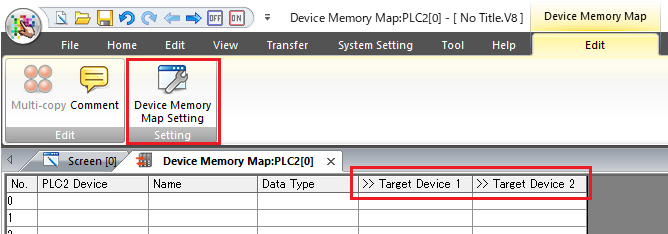
↓
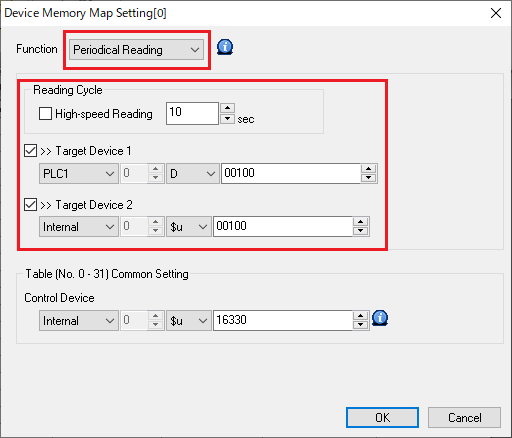
- Double-click on the following to set the source device memory address.
E.g. Every 10 seconds, read data from PLC2 WM100 to PLC1 D100 and $u100.

Periodic Writing
- Click [System Setting] → [Device Memory Map] → [PLCn]. Select a device memory map number and click [OK].
- Click [Edit] → [Device Memory Map Setting] or double-click the cell [Target Device 1/2] to display the settings window and set the following.
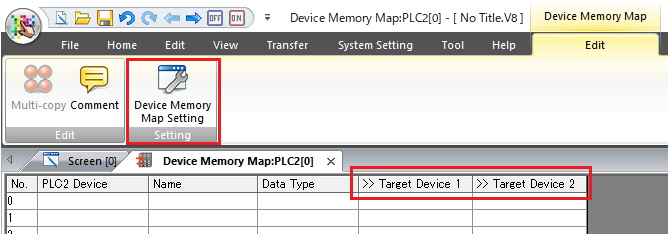
↓
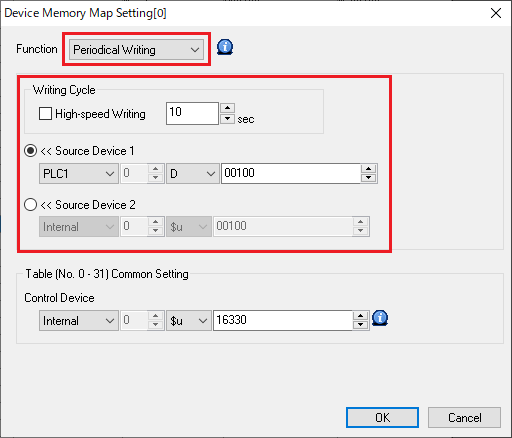
- Double-click on the following to set the destination device memory address.
E.g. Every 10 seconds, write data from PLC1 D100 to PLC2 WM100.
