- GLOBAL > HMI > V10/V9 series > Product Specifications > What types of cables can be used for screen program transfer?
What types of cables can be used for screen program transfer?
What types of cables can be used for screen program transfer?
- Category :
Answer
Screen program transfer is possible using a commercially-available USB or Ethernet cable.
The "V-CP" or "UG00C-T1" serial transfer cable manufactured by Hakko Electronics can also be used.
The following table lists each series and the corresponding available transfer methods.
Series |
USB |
Ethernet |
Serial |
V10 |
〇 |
〇*2 |
〇 |
TS2060(i) |
〇 |
△*2*3 |
〇 |
V8 |
〇 |
△*3*4 |
〇 |
V7 |
△ |
△*3*5 |
〇 |
V6 |
× |
△*6 | 〇 |
V4 *7 |
× |
× |
〇 + "ADP25-M" option |
GD-80 *7 |
× |
× |
〇 |
GD-80S |
× |
× |
△*8 |
*1 If the computer is not equipped with a serial port, use a commercially-available USB-to-serial converter.
Connect "V-CP" or "UG00C-T1" to the MJ1 port on MONITOUCH.
*2 A straight cable can also be used with or without a hub.
*3 Type with built-in LAN port.
*4 When the "CU(N)-03-x","UG03I-E" communication unit is installed.
*5 When the "CU-03-x","UG03I-E" communication unit or "DU-01","UG230A-DCL" option unit is installed.
*6 When the "CU-03-x","UG03I-E" communication unit is installed.
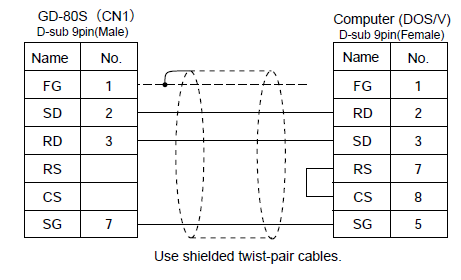
*7 It is possible to make your own cable for serial transfer with the V4/GD-80/GD-81S/UG400/UG210/UG200 by referring to the wiring diagram.
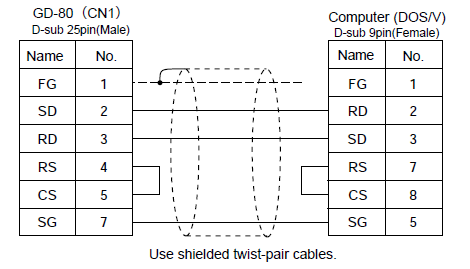
*8 Serial transfer with the GD-80S cannot be performed using the "V-CP" or "UG00C-T1" cable.
Make your own cable by referring to the wiring diagram.