- GLOBAL > HMI > V10/V9 series > Questions about > How to add data sheets to the same PDF file when outputting data sheets as PDF files
How to add data sheets to the same PDF file when outputting data sheets as PDF files
How to add data sheets to the same PDF file when outputting data sheets as PDF files
- Category :
Answer
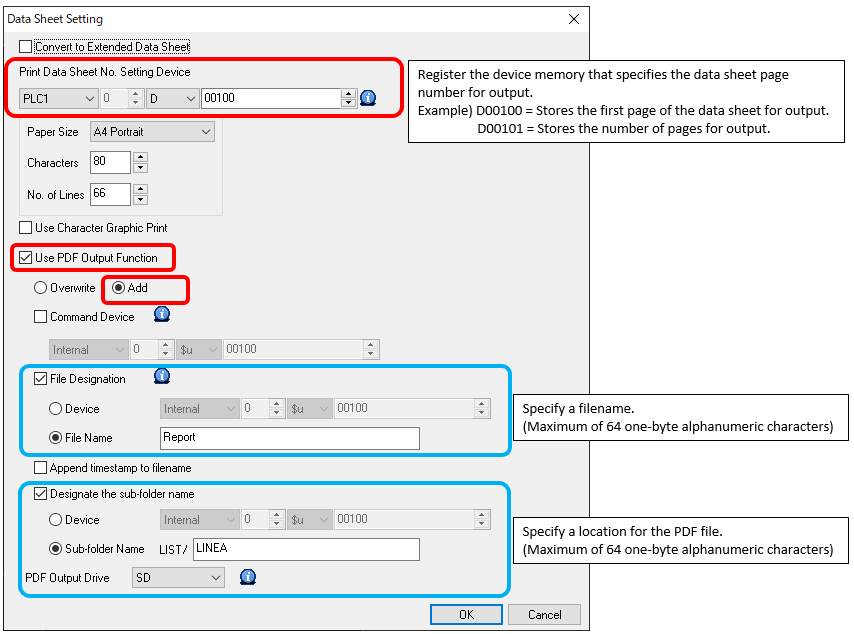
It is possible to add data sheets to the final page of a specified PDF file by selecting [Add] in the PDF output function options.
When adding data sheets to the final page of the PDF located at EXT0000(access folder)\LIST\LINEA\Report.pdf on an SD card
Screen program setting
- Configure the following settings at [System Setting] → [Hardware Setting] → [Printer Properties] → [Data Sheet Setting].
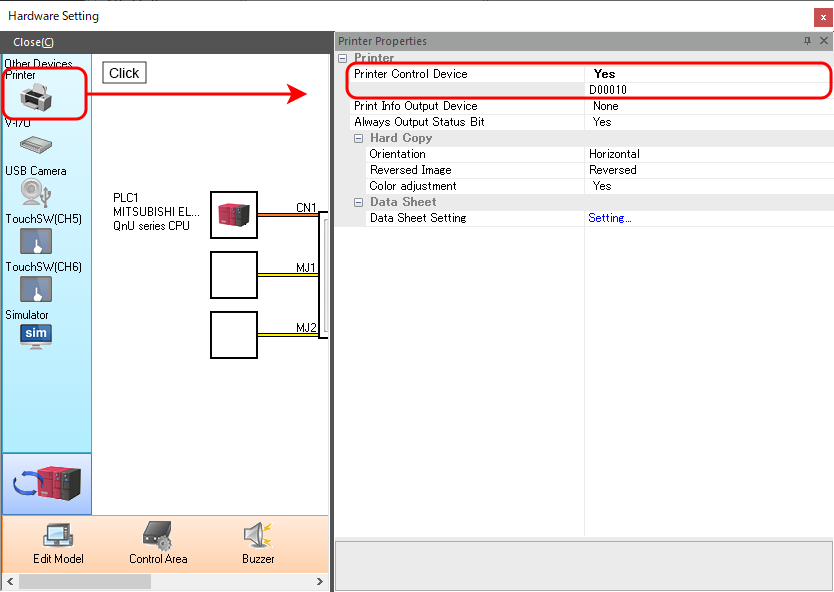
- Configure the [Printer Control Device] settings located at [System Setting] → [Hardware Setting] → [Printer Properties].
The printer control device is the device memory that acts as the trigger for PDF output.
Output procedure on the unit
When adding five pages from data sheet number 1
- Store the first data sheet number for output and the number of pages using [Print Data Sheet No. Setting Device].
D00100 = 1: First page number
D00101 = 5: Number of pages - Turn ON the least significant bit of [Printer Control Device].
D00010-00 bit: ON
The above settings will add the five pages of data sheet numbers 1 to 5 to the final page of Report.pdf.
* To use [Printer Control Device], the printer connection settings must be configured at [System Setting] → [Hardware Setting].
Output using a macro
It is also possible to add data sheets by executing the SYS (STA_LIST) macro command.
$s01656 = FH (W) Turn ON least significant four bits (PDF add instruction)
$u00100 = 1 (W) First page
$u00101 = 5 (W) Number of pages for output
$u00102 = 'Report' (STRING) Filename
$u00134 = 'LINEA' (STRING) Subfolder name
SYS (STA_LIST) $u00100
* Printer connection settings are not required when using a macro command.
For more information on data sheets, refer to the Reference Manual 1.
Download here.