- GLOBAL > HMI > V10/V9 series > Questions about > How to switch between English and Japanese
How to switch between English and Japanese
How to switch between English and Japanese
- Category :
Answer
It is possible to create screen programs with screens in multiple languages using V-SFT-6 and switch between languages with the language changeover function on the MONITOUCH unit.
The required operations are described below.
- Setting fonts
- Editing each language
- Configuring the language changeover switch
Setting fonts
- Click [System Setting] [Multi-language setting].
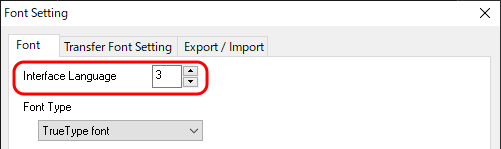
- Set [Interface Language].
- Click [Setting] and select the language to switch to.
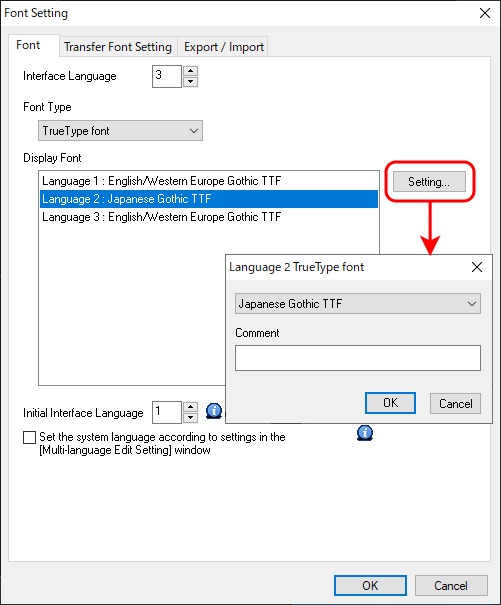
- Set the language number to display after screen program transfer for [Initial Interface Language].
This completes the necessary settings.
Editing in multi-language
There are three ways to edit screens in each language.
For more information on editing methods, click here.
- Directly edit items
- Edit in the [Multi-language] editing window
- Export/import
* For information on the settings required to input foreign languages on your version of Windows, click here.
Configuring the language changeover switch
- Place a switch for changing between languages.
- Set [Function] to [Language changeover] and select the switching method.
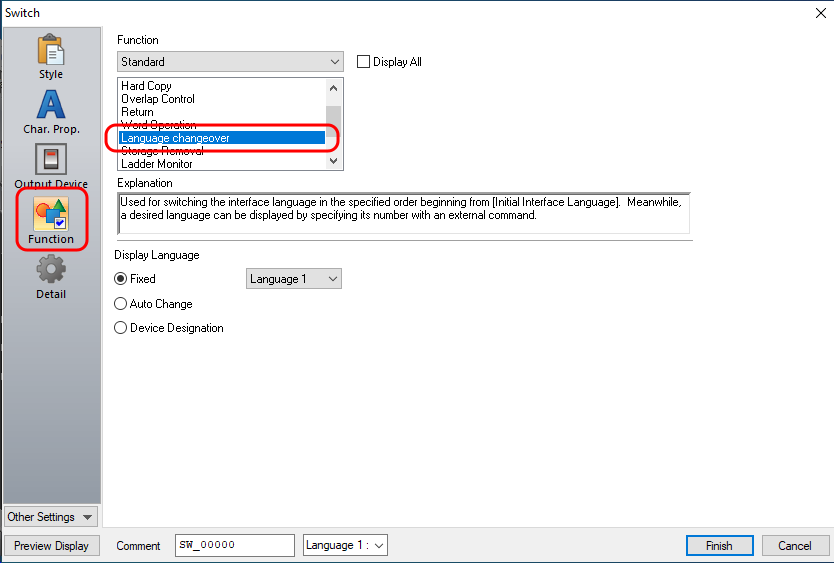
- Fixed: Switch to the specified language number and display
the corresponding language.
- Auto Change: Switch from the language set for [Initial Interface Language]
in the [Font Setting] window in order and display the
corresponding language. Languages that are not set are
skipped.
- Device Designation: Switch to the language number of the value stored in device
memory and display the corresponding language.
0: Language 1, 1: Language 2, etc.
* The language can also be switched using the SYS (CHG_LANG) macro command.
For more information, click here.