- GLOBAL > HMI > V10/V9 series > Questions about > I want to check network connection of Ethernet.
I want to check network connection of Ethernet.
I want to check network connection of Ethernet.
- Category :
Answer
Check the network condition with V10/V9's [Network Test] and [Duplicate IP Test] screens.
Network test (send ping command)
This is to check whether the V10/V9 establishes connection with target device.
- Display V10/V9's local screen.
* How to switch to the local screen
V10 series: Click here.
V9 series: Click here.
- From the left pane, go to [I/O Check] > [Network Test].
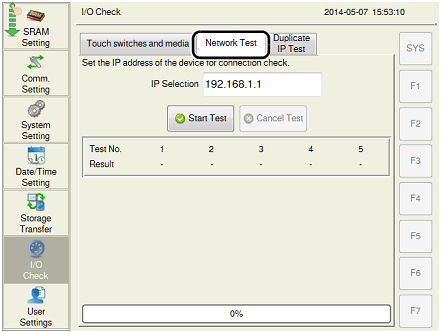
- Enter the target IP address to [IP selection] and press [Start Test] button.
Test results:
OK: Network connection is established.
NG: Network connection is not established. Please check LAN cables and the IP address.
Duplicate IP Test
This is to check whether any device with the same IP address as V10/V9's exists on the network.
- Display V10/V9's local screen.
* How to switch to the local screen
V10 series: Click here.
V9 series: Click here.
- From the left pane, go to [I/O Check] > [Duplicate IP Test].
- Press [Start Test] button.
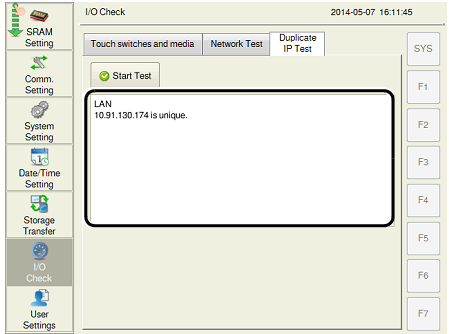
When a duplicated IP address is found on the network, please check IP address of each device and set the address adequately.