- GLOBAL > HMI > V10/V9 series > Questions about > How to check the communication condition between the temperature controller and the V series
How to check the communication condition between the temperature controller and the V series
How to check the communication condition between the temperature controller and the V series
- Category :
Answer
The temperature controller condition is output to the system device memory of the V series.
Check the following device memory addresses for each station number.
Click [System Setting] -> [Hardware Setting] and display a [PLCx Properties] dialog on the V-SFT editor. Then select [Disconnect] for [Comm. Error Handling].
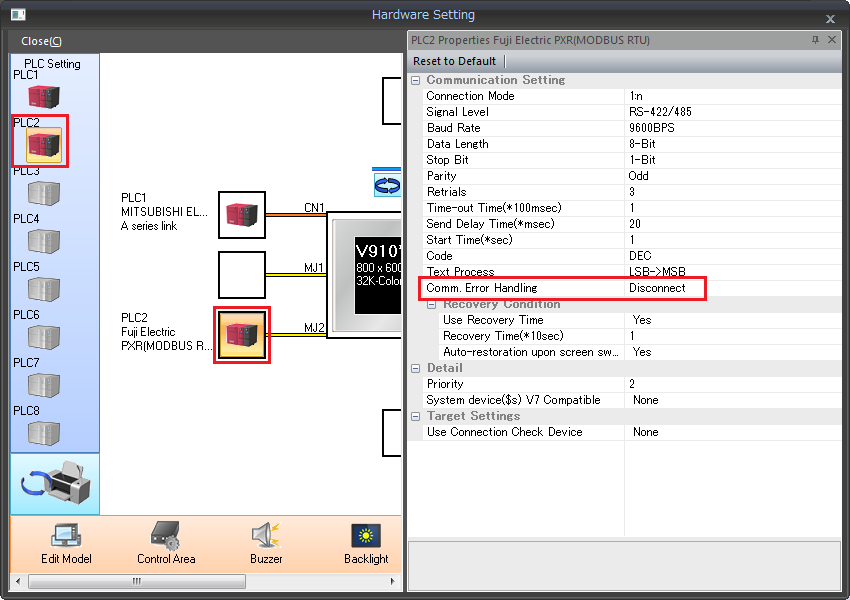
- The communication results with each station are stored in the system device memory as below.
Assign system device memory addresses to numerical data display parts for monitoring.
System device memory: $Pn: 100 - 355 (n: PLC1 - 8) ..... Station No. 0 - 255
Example: When a temperature controller is registered to PLC2 as station No. 10, monitor $P2: 110.
Error details
Code (HEX) |
Description |
0000H |
Normal |
FFFFH |
Timeout |
8001H |
Check code error |
8002H |
Data error |
800BH |
Error code received from the |
* The received code can be acquired at $Pn: 508 to 511. For more information, click here.
Other error codes are shown below:
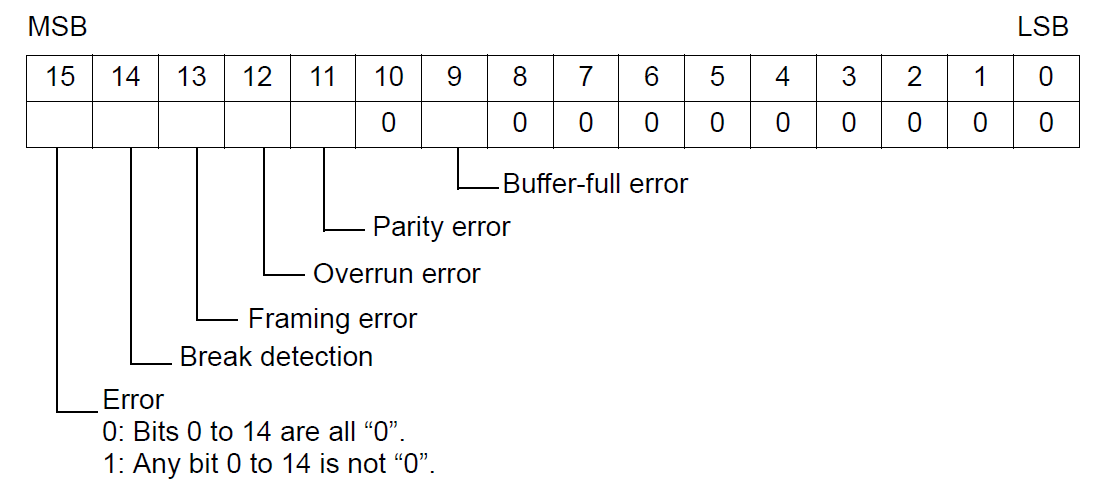
Error |
Details |
Solution |
Timeout |
Although a request to send is given, no answer is returned within the specified time. |
Take actions 1, 2, and 3. |
Check code |
The response check code is not correct. |
Take actions 1 and 3. |
Data error |
The received code is invalid. |
Take actions 1, 2, and 3. |
Error code received |
An error is occurring at the connected device. |
Refer to the PLC manual. |
Buffer full |
The buffer of the V series is full. |
Contact your HAKKO representative. |
Parity |
A parity check error has occurred. |
Take actions 2 and 3. |
Overrun |
After one character is received, the next character is received before internal processing is completed. |
Take actions 1 and 3. |
Framing |
Although the stop bit must be "1", it is detected as "0". |
Take actions 1, 2 and 3. |
Break detection |
The SD of the connected device remains at the low level. |
Check connection to the SD/RD of the connected device. |
What to do:
- Check that communication settings of the V series match those of the connected device.
- Check the cable connection.
- Data may be disrupted because of noise. Provide protection against noise.