


-
Products & Solutions TopProducts & Solutions

-
 Products & Solutions Top
-
Drives & Controls
-
UPS & Industrial Power Supply
-
Sensors & Measurements
-
Energy Management
-
Monitoring & Control System
-
Distributions & Controls
-
Transmission & Distribution
-
Transit System
-
Semiconductors
-
Energy
-
Food and Beverage Distribution
-
Service & Equipment Upgrades
-
Solutions
-
-
IR TopInvestor Relations
- GLOBAL > HMI > TELLUS and V-Server > Questions about > <TELLUS-Remote> I want to synchronize the TELLUS remote screens and the monitored device.
<TELLUS-Remote> I want to synchronize the TELLUS remote screens and the monitored device.
<h1 style="font-family:Arial, sans-serif;font-size:16.56px;padding:5px 0px 5px 40px;"><TELLUS-Remote> I want to synchronize the TELLUS remote screens and the monitored device.</h1>
- Category :
Answer
Select synchronization mode from "Remote Monitor Setting" in V-Server.
Procedure
- On V-Server, select the monitored device which you wish to have synchronous display.
- Go to [Edit] > [Remote Monitor Setting].
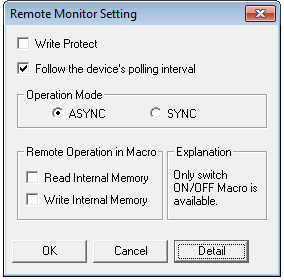
- Go to [Operation Mode] and select [ASYNC] then click [OK].
When a screen on the monitored devices switches over to another screen, remote mode screen also changes over.
* Other than screen change over, normal overlap and call overlap are also displayed synchronously.
However, mult-overlap controlled by switch operation will not be synchronized.
To synchronize multi-overlap display, please control it with external command from PLC.