


-
Products & Solutions TopProducts & Solutions

-
 Products & Solutions Top
-
Drives & Controls
-
UPS & Industrial Power Supply
-
Sensors & Measurements
-
Energy Management
-
Monitoring & Control System
-
Distributions & Controls
-
Transmission & Distribution
-
Transit System
-
Semiconductors
-
Energy
-
Food and Beverage Distribution
-
Service & Equipment Upgrades
-
Solutions
-
-
IR TopInvestor Relations
- GLOBAL > HMI > V8/TS2060 series > Questions about > How to assign a function to each function switch
How to assign a function to each function switch
How to assign a function to each function switch
- Category :
Answer
The function switches can be used for preset purposes in the RUN mode.
[Function switch operation regardless of the currently displayed screen]
Select [System Setting] → [Global Setting] → [Global Function Switch Setting] on the V-SFT editor and configure settings.
Example: Press function switch [F1] to display screen No. 10.
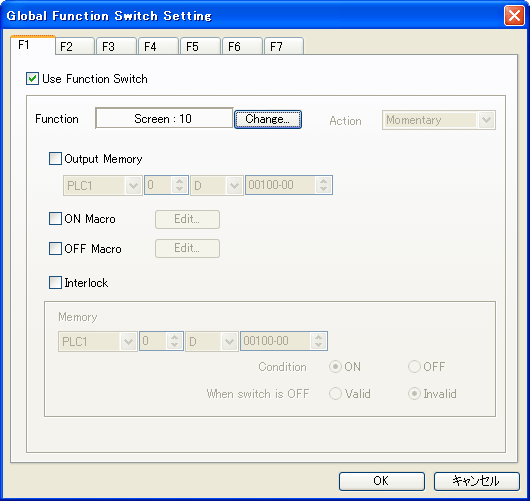
|
If [Local Function Switch Setting] has been made for the screen being displayed, it takes higher priority. |

[Function switch operation only on the currently displayed screen]
Select [Screen Setting] → [Local Function Switch Setting] on the V-SFT editor and configure settings.