-
Products & Solutions TopProducts & Solutions

-
 Products & Solutions Top
-
Drives & Controls
-
UPS & Industrial Power Supply
-
Sensors & Measurements
-
Energy Management
-
Monitoring & Control System
-
Distributions & Controls
-
Transmission & Distribution
-
Transit System
-
Semiconductors
-
Energy
-
Food and Beverage Distribution
-
Service & Equipment Upgrades
-
Solutions
-
-
IR TopInvestor Relations
- GLOBAL > HMI > V8/TS2060 series > Questions about > How to sound a continuous buzzer according to a command from the PLC (external)
How to sound a continuous buzzer according to a command from the PLC (external)
How to sound a continuous buzzer according to a command from the PLC (external)
- Category :
Answer
Configure settings as follows.
- Select [System Setting] → [Unit Setting] → [General Settings] on the V-SFT editor and check [Use Continuous Buzzer Sound].
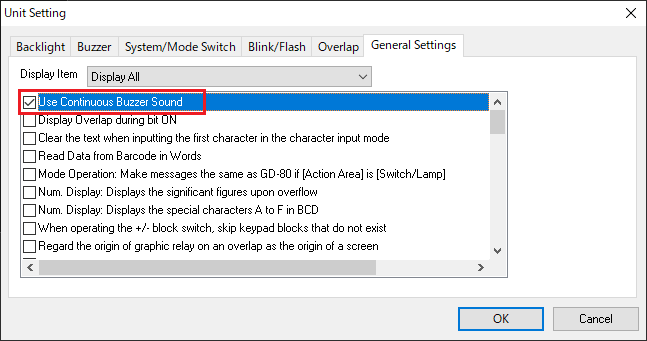
- A continuous buzzer sounds while bit 10 of read area "n" is set (ON).
 |
It is also possible to sound a one-shot buzzer or an error buzzer according to the command from the PLC. |
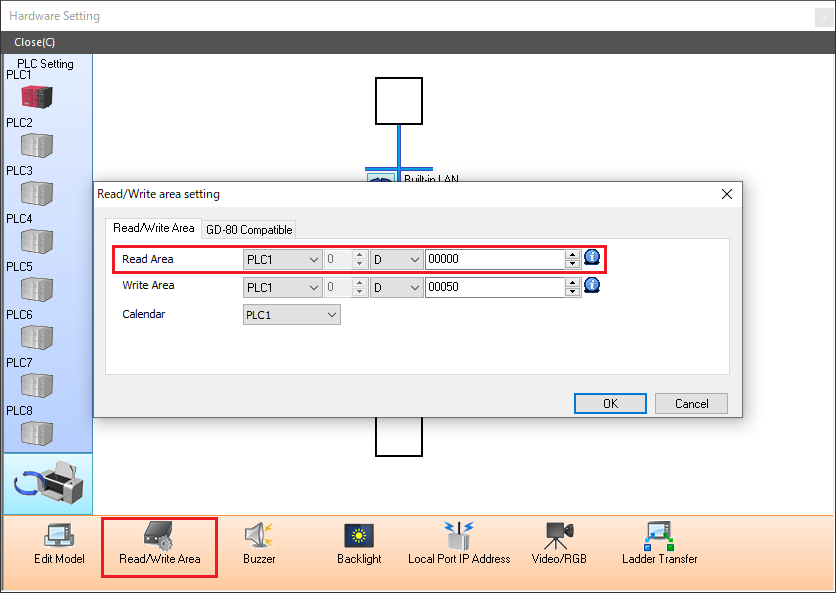
[How to check the read area]
V8/TS series
Check position: V-SFT-6 editor [System Setting] → [Hardware Setting] → [Read/Write Area] → [Read Area]
V7 series
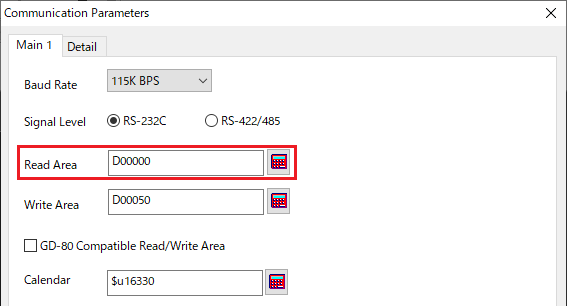
Check position: V-SFT-5 editor [System Setting] → [PLC Communication] → [Communication Parameter] → [Main 1]