


-
Products & Solutions TopProducts & Solutions

-
 Products & Solutions Top
-
Drives & Controls
-
UPS & Industrial Power Supply
-
Sensors & Measurements
-
Energy Management
-
Monitoring & Control System
-
Distributions & Controls
-
Transmission & Distribution
-
Transit System
-
Semiconductors
-
Energy
-
Food and Beverage Distribution
-
Service & Equipment Upgrades
-
Solutions
-
-
IR TopInvestor Relations
- GLOBAL > HMI > V10/V9 series > Questions about > Can I output data sheet in softcopy?
Can I output data sheet in softcopy?
Can I output data sheet in softcopy?
- Category :
Answer
Yes, data sheet can be output to a storage device (SD card/USB drive) in PDF using PDF output feature.
Output directory
\Access folder\LIST\Year-month folder\year-month-day folder
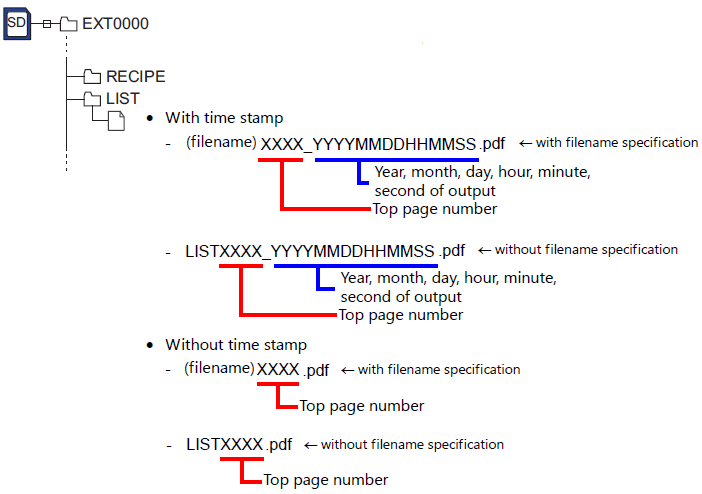
* By specifying a subfolder, it is also possible to output data sheets
to any folder under \Access folder\LIST\.
Setting location
An example of creating a time-stamped PDF file
in \Access folder\LIST\(year/month folder)\(year/month/day folder)
on an SD card is explained below.
- Click [System Setting] → [Hardware Setting] → [Printer] → [Printer Properties]
→ [Data Sheet Setting], or click [Home] → [Registration Item] → [Data Sheet]
→ [Edit] → [Data Sheet Setting].
- Select the [Use PDF Output Function] checkbox in the [Data Sheet Setting] window that appears.
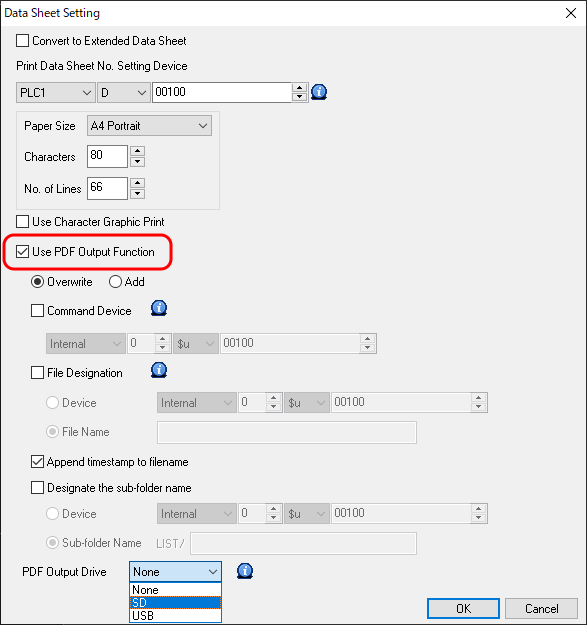
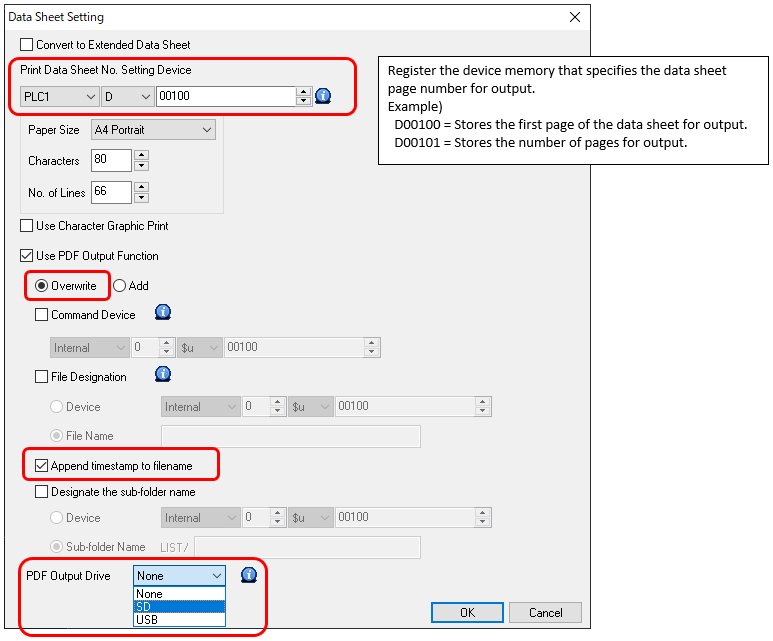
- Configure the following settings.
- [Print Data Sheet No. Setting Device]: D00100
- [Overwrite]
- [Append timestamp to filename]
- [PDF Output Drive]: SD
* Selecting the [Command Device] checkbox allows the data sheet output
destination and output method to be changed in RUN mode.
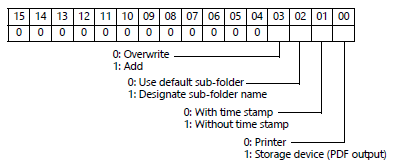
When using the STA_LIST macro, select the output destination and
whether to add a time stamp using $s1656.
The contents of $s1656 is the same as the device memory selected for output.
* A filename can be specified by selecting the [File Designation] checkbox.
(Maximum of 64 one-byte alphanumeric characters)
* The output destination folder can be specified by selecting
the [Designate the sub-folder name] checkbox.
(Maximum of 64 one-byte alphanumeric characters)
- Configure the [Printer Control Device] settings located at
[System Setting] → [Hardware Setting] → [Printer Properties].
The printer control device is the device memory that acts as the trigger for PDF output.
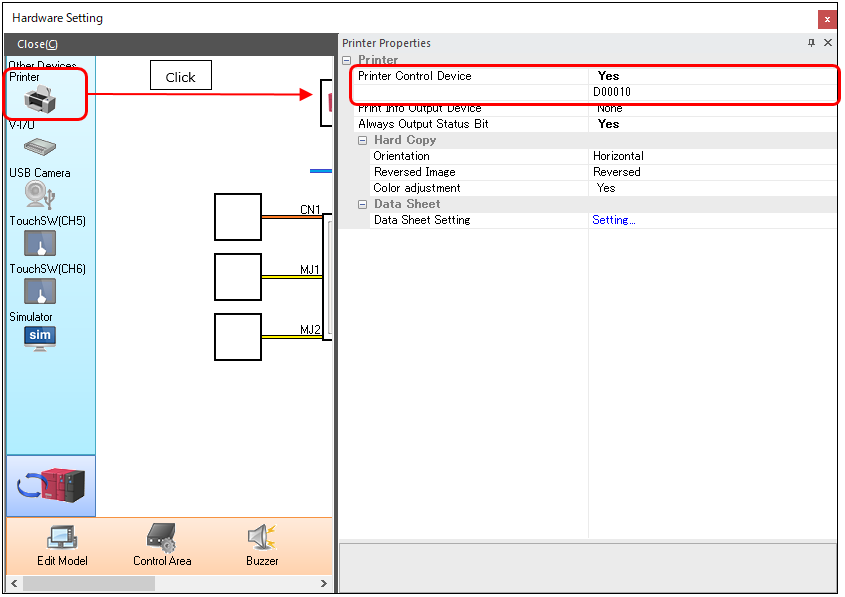
Output method
Command from a device memory for printer control
- Store the first page number of the data sheet and the number of pages
for output using [Print Data Sheet No. Setting Device].
D00100 = 1: First page number
D00101 = 5: Number of pages for output
- Turn ON the bit 0 of [Printer Control Device].
D00010-00 bit: ON
Page numbers 1 to 5 of the data sheet screen are output to a PDF file.
Command with macro
Example) PDF output with time stamp, filename: TEST, pages 1 to 5 of data sheet screen
Execute the following macro.
$s01656 = 1 (W) Bit 0: PDF output destination
$u00100 = 1 (W) First page
$u00101 = 5 (W) Number of pages for output
$u00102 = 'TEST' (STRING) Filename
SYS (STA_LIST) $u00100
For more information on data sheets, refer to V9 Series Reference Manual 1.
Download here.