


-
Products & Solutions TopProducts & Solutions

-
 Products & Solutions Top
-
Drives & Controls
-
UPS & Industrial Power Supply
-
Sensors & Measurements
-
Energy Management
-
Monitoring & Control System
-
Distributions & Controls
-
Transmission & Distribution
-
Transit System
-
Semiconductors
-
Energy
-
Food and Beverage Distribution
-
Service & Equipment Upgrades
-
Solutions
-
-
IR TopInvestor Relations
- GLOBAL > HMI > V10/V9 series > Questions about > I want to use a tablet PC to monitor and operate V10/V9 screens.
I want to use a tablet PC to monitor and operate V10/V9 screens.
I want to use a tablet PC to monitor and operate V10/V9 screens.
- Category :
Answer
VNC server function provides both.
System configuration:
Tablet PC : VNC client
V10/V9F VNC server
e.g.
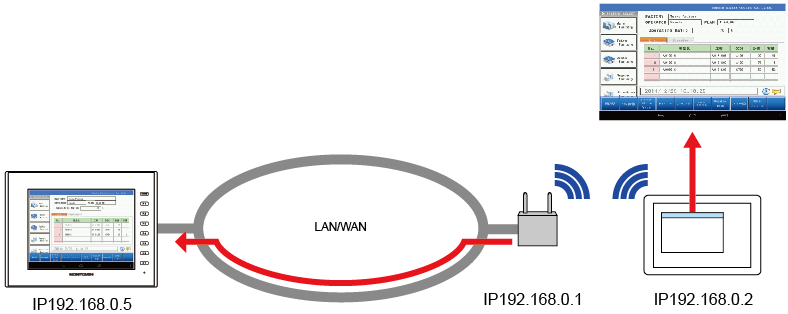
Follow the steps below to connect.
1. Install the VNC Viewer app
Install the VNC Viewer app on the VNC client device (tablet).
2. Network connection
Connect the V10/V9 series unit and the VNC client device to the network.
Refer to the respective manuals for the settings of the VNC client device.
3. Settings on the V10/V9 unit
Register a gUser Nameh and gPasswordh for the VNC server in [User Settings] on the Local screen.
4. Access V10/V9 from VNC Viewer application
Start the VNC Viewer application and specify the IP address of V10/V9 to connect.
If a connection can be made, the V10/V9 screen will be displayed in the VNC Viewer app.
--> Click here for VNC connection using gSimple Remoteh (Android)