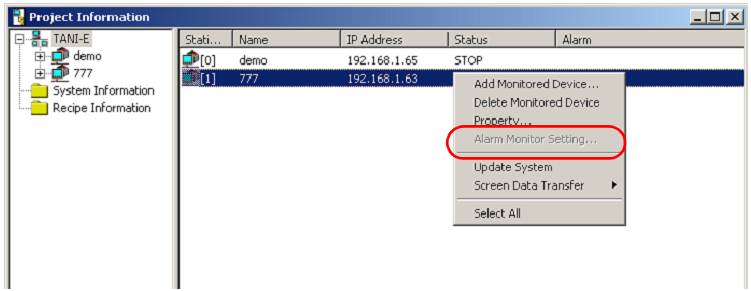
- GLOBAL > HMI > TELLUS and V-Server > Operation Troubles > I want to use alarm monitoring function on V-Server, but the option [Alarm Monitor Setting] is inactive.
I want to use alarm monitoring function on V-Server, but the option [Alarm Monitor Setting] is inactive.
I want to use alarm monitoring function on V-Server, but the option [Alarm Monitor Setting] is inactive.
- Category :
Answer
Check the points below.
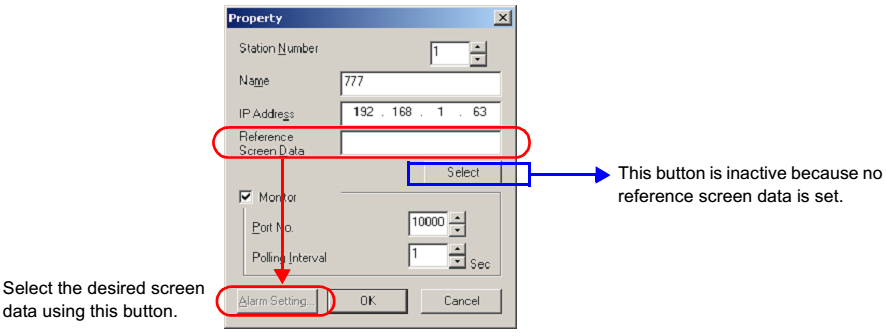
In the [Property] dialog box for the monitored device, is the setting for [Reference Screen Data] correct?
If not setting is made, the [Alarm Setting] button is inactive. Proceed to the selection of screen data using the [Select] button.
Click [Select] button to select a screen program to refer.
Does the reference screen data contain the alarm function setting?
Check to see the [Alarm server]* setting.
If there is no alarm server setting in your screen program, set it accordingly.
*For TS2060i/V8/V7 series, you can monitor the buffering area that you specified in "Sampling method: Alarm function".