- GLOBAL > HMI > TELLUS and V-Server > Operation Troubles > I cannot do the following in the TELLUS-HMI mode: WAV file replay JPEG file display Reading and writing a recipe file [RECxxxx.csv]
I cannot do the following in the TELLUS-HMI mode: WAV file replay JPEG file display Reading and writing a recipe file [RECxxxx.csv]
I cannot do the following in the TELLUS-HMI mode:
WAV file replay
JPEG file display
Reading and writing a recipe file [RECxxxx.csv]
WAV file replay
JPEG file display
Reading and writing a recipe file [RECxxxx.csv]
- Category :
Answer
[Causes]
- WAV files or JPEG files are not stored in the correct folder.
- For WAV file replay, settings on a screen program is not correct.
[Solutions]
The location is set under [Generate folder at:] in the [Option] dialog box.
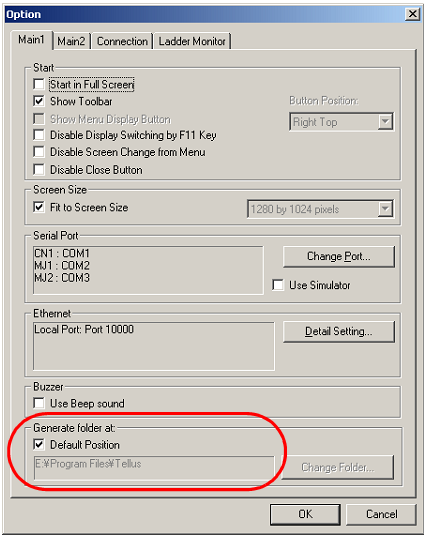
[Default Position] is checked:
In the location where the screen data in the HMI mode is stored, a folder under the name of the screen data is created.
- For TELLUS4
Create a WAV, a JPEG, and a RECIPE folder manually under storage>sd or usb>EXT0000 (access folder) and store these files respectively.
- For TELLUS3
Create a WAV, a JPEG, and a RECIPE folder manually in it and save these files respectively.
[Default Position] is not checked:
Directory to generate a folder is determined in [Option] > [Change folder].
- For TELLUS4
Create a WAV, a JPEG, and a RECIPE folder manually under storage>sd or usb>EXT0000 (access folder) and store these files respectively.
- For TELLUS4
For TELLUS3
Create a WAV, a JPEG, and a RECIPE folder manually in it and save these files respectively.
e.g.) TELLUS3
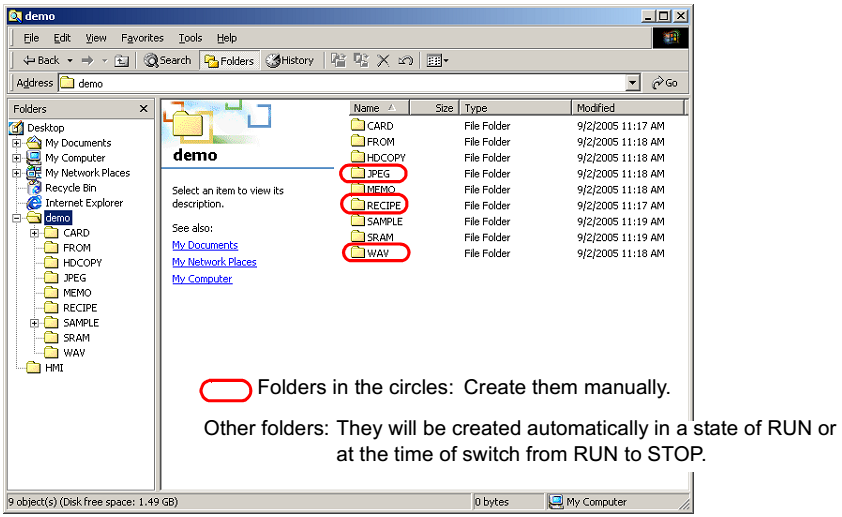
| Folder | File name | Content |
| JPEG | xxxx.jpg, JPxxxxx.jpg | JPEG file |
| RECIPE | RECxxxx.csv, xxxxxxxx.csv | Recipe file |
| WAV | WAxxxx.wav | WAVE file |
2. For WAV file replay, start V-SFT and go to [System Setting] > [Other] > [Storage Setting] and check [Store WAV File in storage] check box.