- GLOBAL > HMI > V8/TS2060 series > Error > "Communication Error Received Code No. 05"
"Communication Error Received Code No. 05"
"Communication Error Received Code No. 05"
- Category :
-
- GLOBAL > HMI > V8/TS2060 series > Error
Answer
[Communication with a PLC]
Refer to the following FAQ page.
"No:4708 Communication error "Error code received"
[Communication with simulator]
This error is displayed when the simulator has encountered "invalid memory"
(access to a non-existent device memory address).
<Solution>
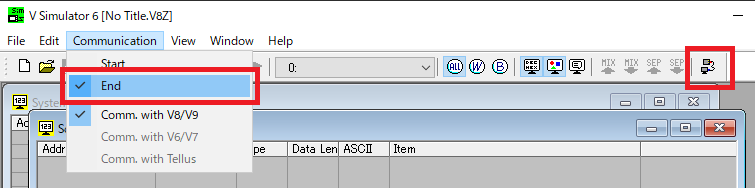
- Select [Start] →[End] for simulator communication.
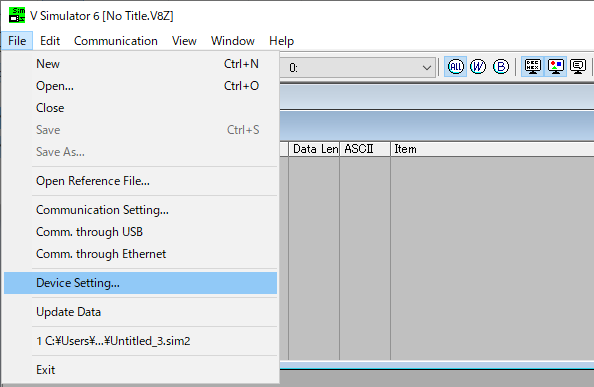
- Click [File] →[Device Setting].
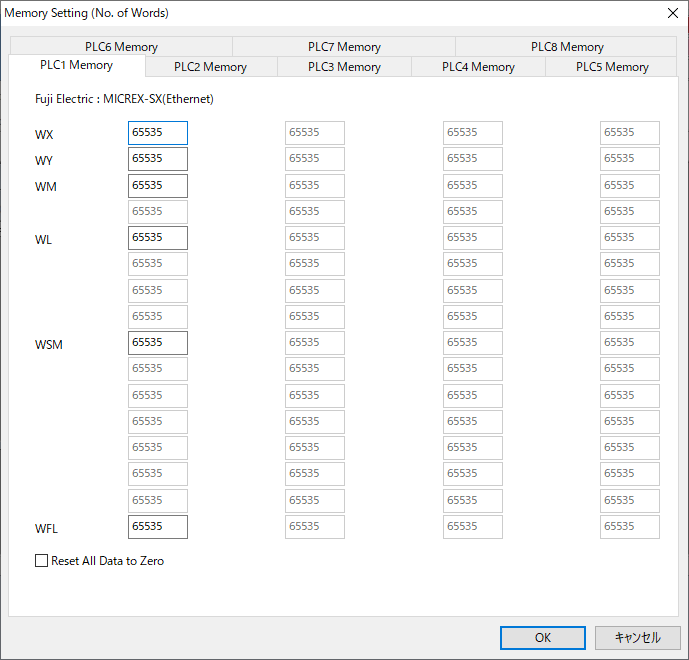
- The [Memory Setting (No. of Words)] dialog is displayed. Specify the range of memory addresses available with the PLC and click [OK].
 |
If an address out of the range available with the PLC is assigned in the screen data: When the device memory address range is set on the [Memory Setting] dialog for the simulator, the screen can be displayed on the TS/V series. However, when connected to the PLC, "Error code" or "Invalid memory" error will be displayed on the TS/V series. It is recommended that the memory address range available with the PLC be set correctly on the [Memory Setting] dialog. |