- GLOBAL > HMI > V10/V9 series > Questions about > How to save logging data even after turning off power to the V series
How to save logging data even after turning off power to the V series
How to save logging data even after turning off power to the V series
- Category :
Answer
Set "SRAM" as the saving destination of logging data.
With [SRAM] selected, backup power is supplied from the battery attached to the MONITOUCH when the power is OFF.
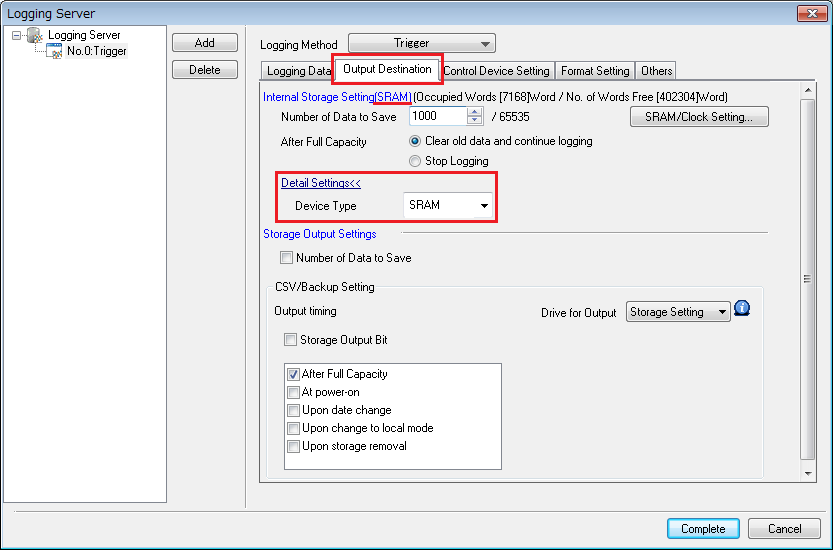
Click [System Setting] -> [Logging Server] and then select a logging block number.
Click [Output Destination] -> [Detail Settings] and set [Device Type] as "SRAM".
(Default setting: SRAM)
Transfer the screen data.
"Error : 163 (SRAM : 0)" or "161 (SRAM : 0)" is displayed.
The V series SRAM must be formatted.
Switch the V series to Local mode, and press [SRAM Setting] -> [Format] -> [Execute].
For more information, click here.
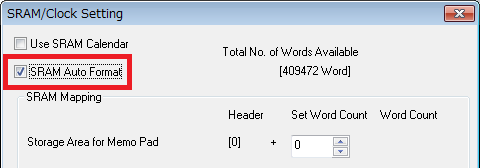
* Click [System Setting] -> [Unit Setting] -> [SRAM/Clock] and check [SRAM Auto Format] to automatically format the SRAM.