- GLOBAL > HMI > V10/V9 series > Operation Troubles > The graph of a trend part (Display Mode: Real Time Display) is not displayed.
The graph of a trend part (Display Mode: Real Time Display) is not displayed.
The graph of a trend part (Display Mode: Real Time Display) is not displayed.
- Category :
Answer
<Causes>
- No data is stored in the device memory address for each graph number.
- The number of points to plot is not specified in the control device memory.
<Solutions>
- Check if data is stored in the number of device memory addresses as specified for [Points to Display] starting from the device memory address specified for [Device] for each graph number.
Example: [Points to Display]: 180, [Device] for graph No. 0: WM100
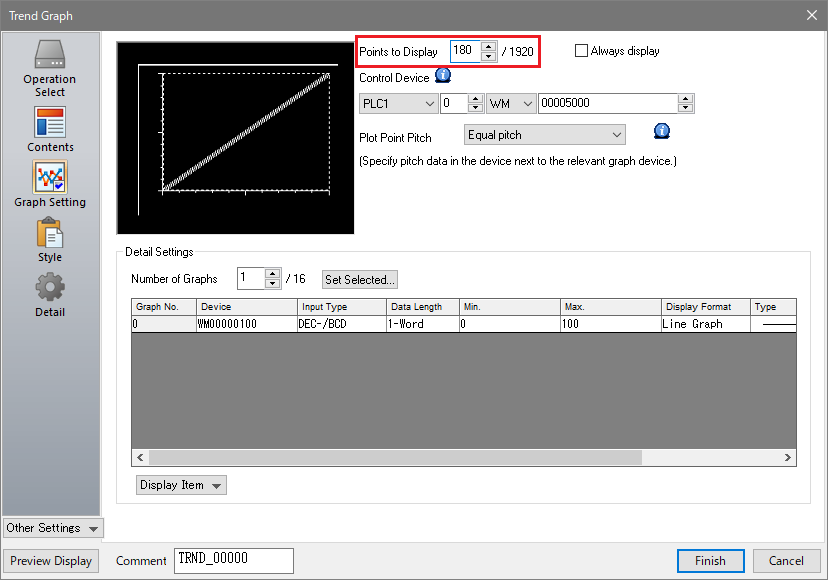 Store data in WM100 to WM279.
- Check if the number of points to plot (1 to 1920) is stored in bit 0 to bit 10 of the control device memory.
Example: Control device memory: WM5000, number of plotted points: 180
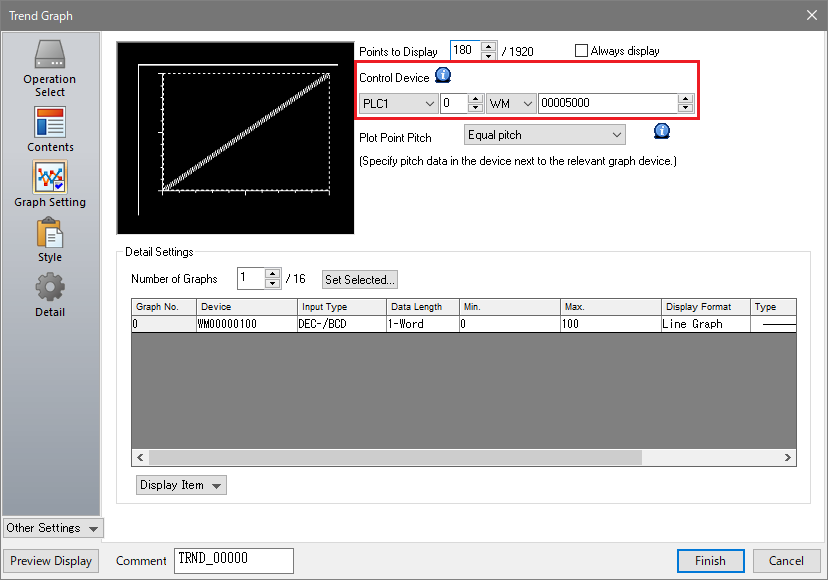 Specify the number of points to plot (180) in bit 0 to bit 10 of WM5000.
- * Click here for details on [Control Device] and [Points to Display] for trend parts ([Display Mode: Real Time Display]).