- GLOBAL > HMI > V10/V9 series > Error > Screen Data Error "Error: 161 (SRAM:x)"
Screen Data Error "Error: 161 (SRAM:x)"
Screen Data Error "Error: 161 (SRAM:x)"
- Category :
-
- GLOBAL > HMI > V10/V9 series > Error
Answer
This error is displayed when the SRAM area is not formatted on the V10/V9 series unit.
<Causes>
The following conditions cause this error.
A. When a screen program that uses SRAM is transferred for the first time after
purchase
B. When the battery voltage drops and the SRAM area is erased on MONITOUCH
to which a screen program that uses SRAM has been transferred
<Solutions>
Case A
Format the SRAM area.
Perform formatting on the SRAM Setting screen in Local mode.
For information on the format procedure, click here.
Case B
The message "Battery changeover required" is displayed at the lower right of the System Information screen in Local mode on the V10/V9 series unit.
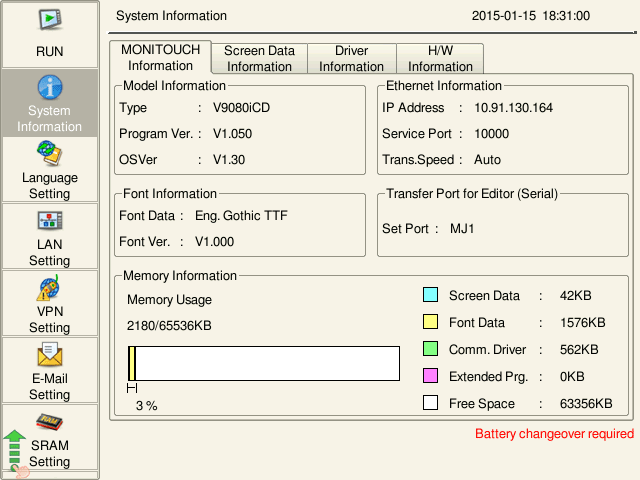
Purchase a "V9-BT" or a "V7-BT" battery and perform battery replacement.
For information on the model name of a replacement battery, click here.
For information on the battery replacement procedure, click on the following links.
For V10: Click here.
For V9: Click here.
The error does not disappear just by replacing the battery. Always format the SRAM area.
For information on the format procedure, click here.
* If Error: 161 (SRAM: x) appears due to a battery voltage drop, all data stored in
SRAM is erased. The data cannot be restored.
The service life of the battery is about 5 years. Replace the battery before the end
of its service life.
|
When [Format the SRAM forcefully] is set in the screen program, a forced formatting is executed at power-on. [Setting location] V-SFT-6: |