- GLOBAL > HMI > V10/V9 series > Error > I want to connect to MICREX-SX but "Communication Error: Error Code received " occurs.
I want to connect to MICREX-SX but "Communication Error: Error Code received " occurs.
I want to connect to MICREX-SX but "Communication Error: Error Code received
- Category :
-
- GLOBAL > HMI > V10/V9 series > Error
Answer
This is an address error. An invalid device memory is set in the screen program.
The causes are listed below.
Cause 1:
X/Y device memory, P/PE link, or FL-Net device memory is specified but the SX device memory information file (.ini file) has not been imported into V-SFT (when the loader software is SX Programmer Standard).
Cause 2:
Linking with the SX project was unsuccessful (when the loader software is SX Programmer Expert).
Cause 3:
The CPU number and the SX station number in the device memory specified in V-SFT do not match the settings on the SX side.
Cause 4:
The specified device memory in V-SFT exceeds the device memory range on the SX side.
For cause 1:
Import the SX device information file (.ini) according to the following procedure.
If the file has already been imported, check that the selected file is correct.
- Export the device information file (.ini) from SX Programmer Standard.
[Project] → [Export] → [Device Information]
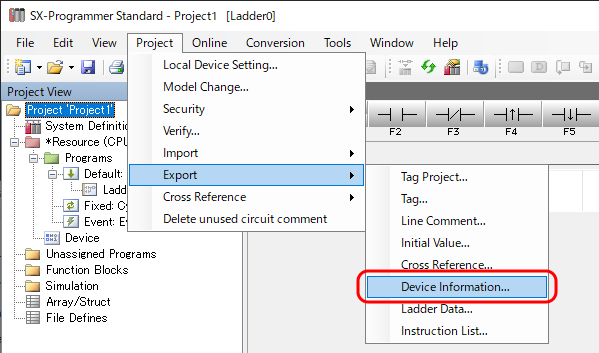
* An .ini file and a folder with the same name as the .ini file are created in the same folder. If the .ini file needs to be moved, move the file together with the folder of the same name.
- Import the device information file (.ini) into V-SFT.
[MICREX] → [Import]
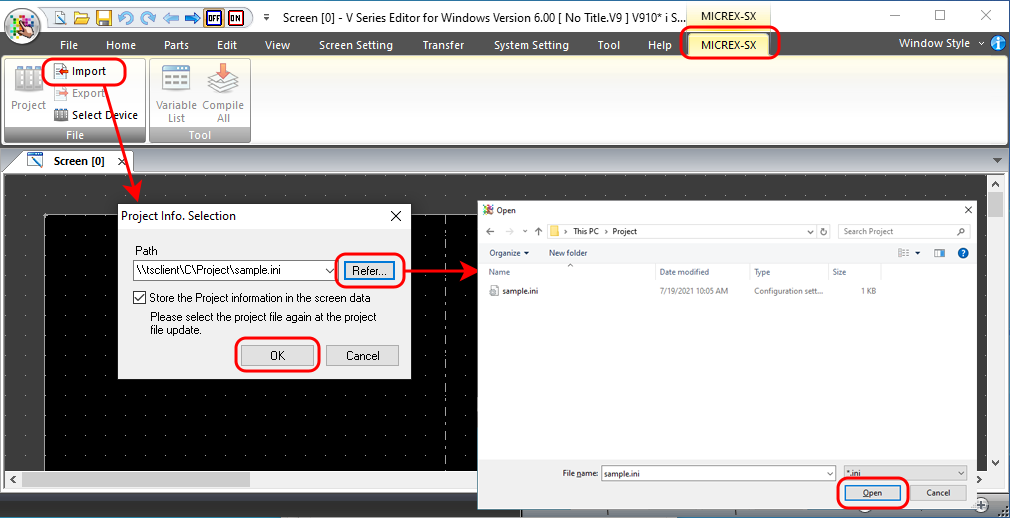 * Selecting the [Store the Project information in the screen data] checkbox allows device memory to be deployed normally even without the .ini file when the screen program is read from the MONITOUCH. If this checkbox is not selected, the .ini file must always be stored at the specified path.
- Click [Tool] → [Error Check] to check for device memory errors.
For cause 2:
Check the following points.
- Is the linked project file correct?
- Are the resource name and worksheet name/group name correct?
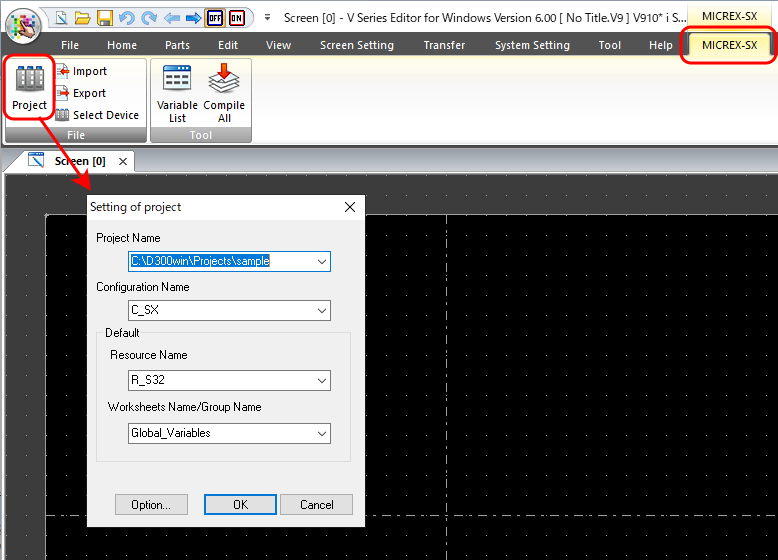
If the linked project or reference target is incorrect, select the correct files.
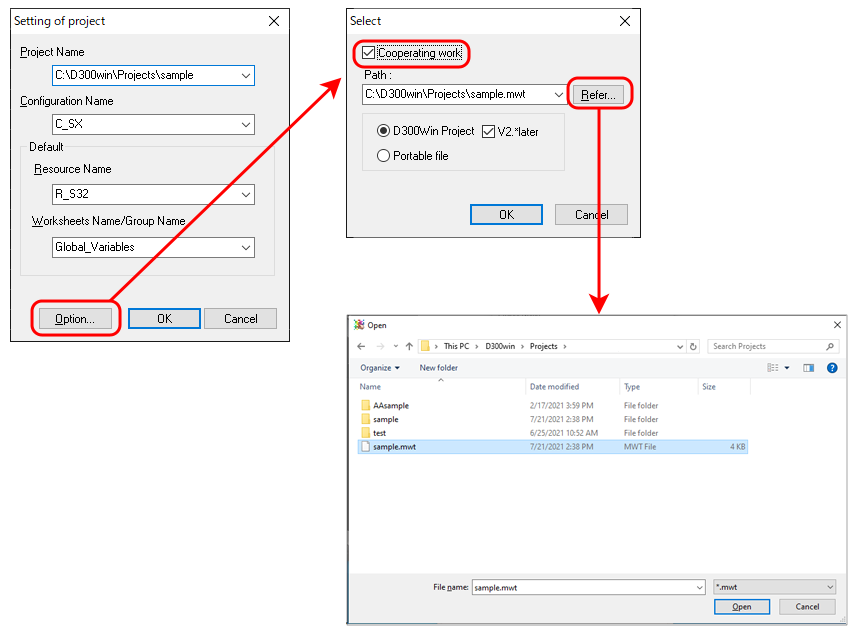
For cause 3:
Check that the device memory settings in V-SFT match the settings on the SX side.
When the loader software is SX Programmer Standard
M, L, SM: Check that the CPU number is correct.
- Word designation: CPU No. 0, WM100 (M1000 to 100F)

CPU No.
- Bit designation: CPU No. 0, M1000

CPU No.
X, Y: Check that the SX station number is correct.
- Word designation: SX station number 0, WX100 (X1000 to 100F)

SX station number
- Bit designation: SX station number 0, X1000

SX station number
When the loader software is SX Programmer Expert and AT designation is used
%M1, %M3, %M10: Check that the CPU number is correct.
- Word designation: %MW1, CPU No. 1, word address 100

CPU No.
- Bit designation: %MX1, CPU No. 1, word address 100, bit address 0

CPU No.
%I, %Q: Check that the SX station number is correct.
- Word designation: %IW, SX station number 1, word address 100

SX station number
- Bit designation: %IX, SX station number 1, word address 100, bit address 0

SX station number
For cause 4:
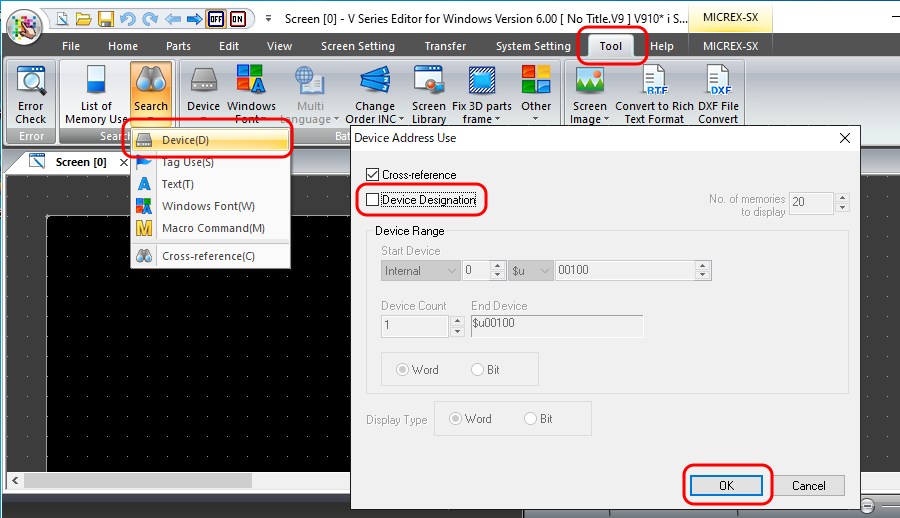
- Check the device memory at [Tool] → [Search] → [Device] → [Device Usage List].
Deselect the [Device Designation] checkbox and click [OK] to display a list of all device memory in use.
- Narrow down the erroneous location by deleting a part of the screen program, transferring the screen program, and then checking whether an error occurs.