- GLOBAL > HMI > V10/V9 series > Questions about > How to sound a buzzer according to a command from the PLC (external)
How to sound a buzzer according to a command from the PLC (external)
How to sound a buzzer according to a command from the PLC (external)
- Category :
Answer
Follow the procedure below.
* For V8-compatible screen programs, use [Read Area].
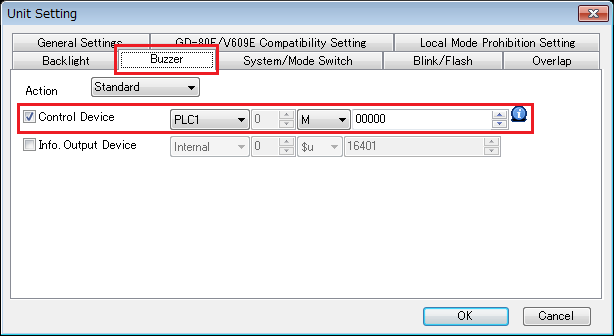
- Click [System Setting] → [Unit Setting] → [Buzzer] on the V-SFT editor.
- Check [Control Device] and set a PLC device memory address.
If the [Control Device] menu is absent, refer to "For V8-compatible screen programs" at the bottom of this page.
- It is also possible to sound a one-shot buzzer or an error buzzer according to commands from the PLC.
Single-shot buzzer (Standard): 100 msec long
Error buzzer (Short): 10 msec long
Continuous buzzer: Continuous
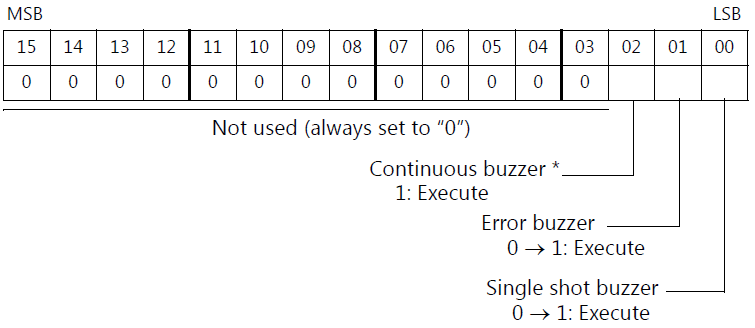
* Check [Use Continuous Buzzer Sound] at [System Setting] > [Unit Setting] > [General Setting].
For V8-compatible screen programs
[Control Device] is not used for screen program converted from V8 series or earlier models. In this case, sound a buzzer using [Read Area].
For more information, click here.