- GLOBAL > HMI > V10/V9 series > Questions about > How to make the screen dark when it is left untouched for a preset time
How to make the screen dark when it is left untouched for a preset time
How to make the screen dark when it is left untouched for a preset time
- Category :
Answer
Set the backlight function to turn the backlight OFF. There are two methods.
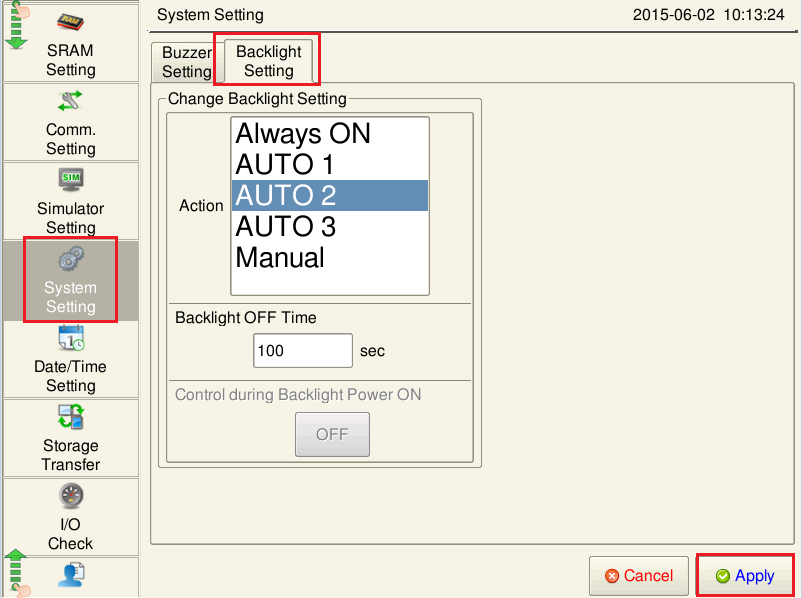
[Setting on the V series]
Local mode → [System Setting] menu → [Backlight Setting] tab
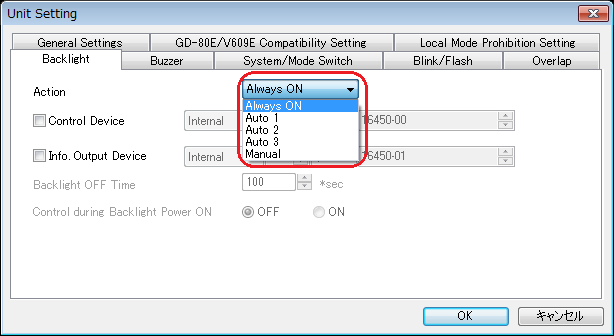
[Setting in the screen data]
Setting location: [System Setting] → [Unit Setting] → [Backlight]
[To make backlight turn OFF when there is no screen display change or touch switch operation for a preset time]
Select [Auto 1] for [Action].
Backlight will turn OFF after the time set for [Backlight OFF Time] has elapsed.
[To make backlight turn OFF when there is no touch switch operation for a preset time even with screen display change]
Select [Auto 2] or [Auto 3] for [Action].
Backlight will turn OFF after the time set for [Backlight OFF Time] has elapsed.
The difference between [Auto 2] and [Auto 3] is the condition for turning the backlight ON. For more information, click here.
[To turn backlight OFF at the timing as specified from the PLC]
Select [Manual] for [Action].
The backlight will turn OFF at the falling edge (1 -> 0) of bit 0 of the control device memory.